

AI governance for small businesses comes down to four decisions: who owns AI use, which tools and tasks are approved, what information those tools may receive, and who checks the results. Write those decisions in a one-page policy, then apply them to one everyday task before you widen access.
Most problems start with ordinary questions. Can staff upload a client file? Connect an assistant to a shared drive? Send an AI-written reply? If you’ve already looked at whether Google Docs trains AI on your files, this guide covers the wider rules your team needs.
What AI Governance for Small Businesses Should Cover
AI governance means deciding how your business uses AI and who answers for it. It covers the information a tool receives, the work it does, who checks it, and what happens when something goes wrong.
Privacy covers information about people. Confidentiality is wider: client briefs, prices, and internal plans need protection even when they name no one.
You don’t need a committee. The NIST AI Risk Management Framework is voluntary guidance that organizations adapt to their size. In practice, AI governance for small businesses can start with one accountable owner and a simple register of approved uses. For each use, record the exact product and account, the task, permitted information, the reviewer, and a review date. Include AI features inside existing software, browser extensions, and work done by contractors.
Decide What Information AI Can Use
Share only what the task needs. The FTC’s guide to protecting personal information tells businesses to know what data they hold, keep only what they need, and limit access. Apply the same rules before anything enters an AI tool.
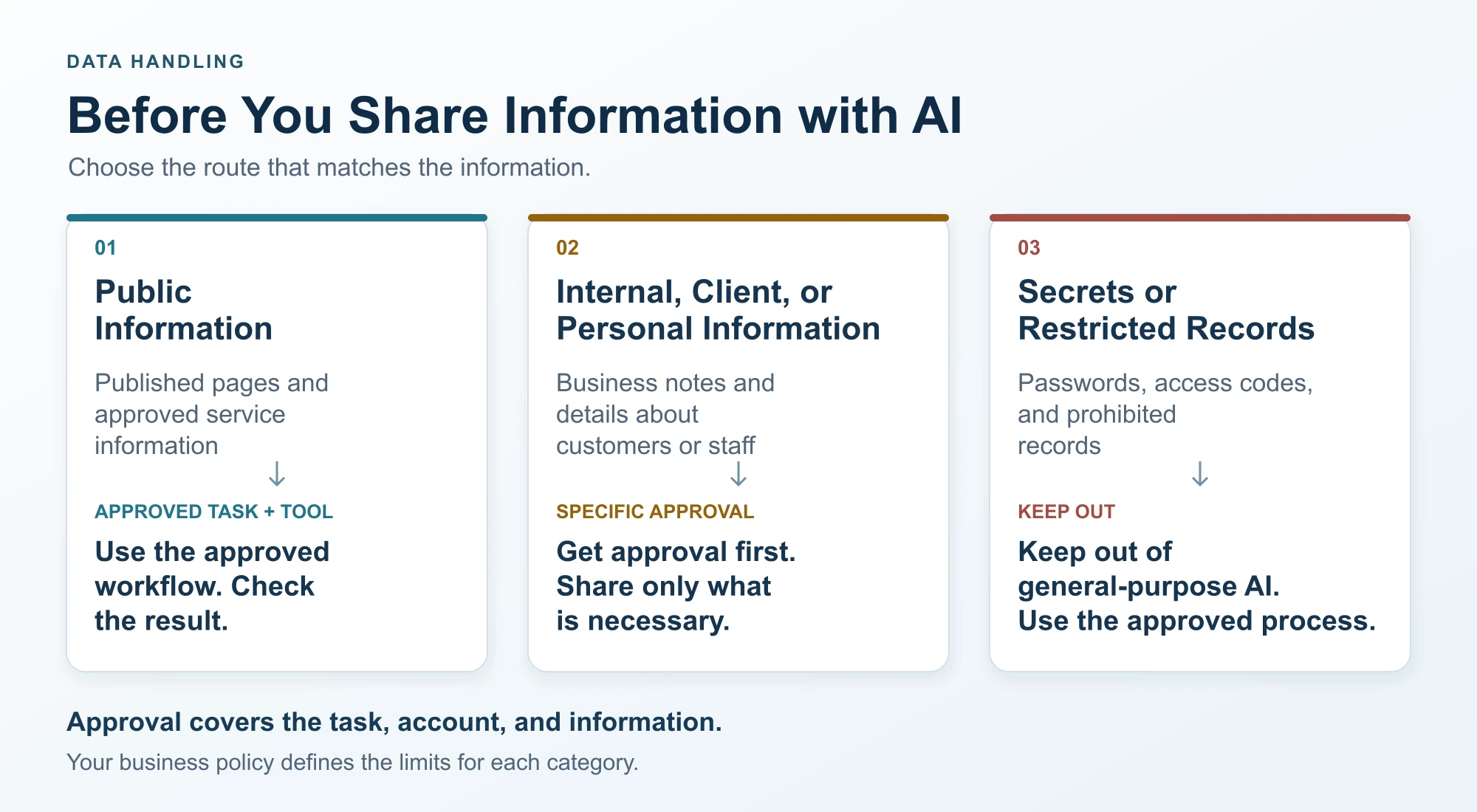
- Public information, such as published service pages, can go into an approved drafting task. Staff still check the result.
- Internal, client, or personal information needs approval for the specific task, account, and data involved.
- Secrets and restricted records, such as passwords, access codes, and payment details, stay out of general-purpose AI assistants.
Use invented or public information when it can do the job. Removing a name doesn’t make a record anonymous, since other details can still identify someone. And asking an AI tool to redact a document means you’ve already shared the original. The same AI data privacy rules apply to uploads, connected folders, screenshots, shared chat links, and saved outputs.
Texas adds one specific rule. The Texas Data Privacy and Security Act exempts businesses that meet the SBA’s small business size standards from most of its duties, but even those businesses may not sell sensitive personal data without the consumer’s prior consent (Sec. 541.107). The attorney general must give 30 days to fix a violation, then can seek up to $7,500 per violation.
Check the Tool, Account, and Permissions
Approve a specific product and account for a specific use. A paid plan or a “business” label doesn’t answer every privacy question.
Keep three questions separate. Training is whether your data improves the vendor’s model. Retention is how long the vendor stores it. Access is who can read it. A promise on one says nothing about the others.
For example, Google’s Workspace privacy hub says Gemini doesn’t use your prompts or content to train generative AI models without permission. That applies to qualifying Workspace accounts, not personal accounts or third-party add-ons. Anthropic’s retention policy says API inputs and outputs are deleted within 30 days, with exceptions such as longer retention you choose or legal requirements. Both were checked on October 27, 2026.
Before approving live business data, the owner should be able to answer:
- Does the service train on inputs or outputs, and does submitting feedback change that?
- How long does it keep prompts, files, outputs, and logs, and what are the deletion exceptions?
- Who can access the data, including the vendor, its subprocessors, and other users?
- Can an admin manage accounts, remove leavers, and require multifactor authentication?
- Can the assistant only read, or can it also send messages and change records?
Access controls decide who can see information and what they can do with it. Give each tool the smallest useful scope: an assistant drafting one project update doesn’t need every client folder. When a task spans several systems, our AI integration services can help plan those connections.
Make Human Review Specific
Human oversight works only when the reviewer knows what to check and can stop the action. Assign someone who can check the source and reject the output. For a client-facing draft, they check:
- Facts, names, dates, and figures against the original records.
- Promises about pricing, scope, deadlines, or availability.
- Confidential details the recipient shouldn’t see.
Require approval before client messages go out, records change, or the business makes financial or contractual commitments. If no reviewer is available, the task goes back to the manual process.
Connected AI automation can do more than draft, so set those permissions separately. Documents and web pages can hide instructions meant to mislead an assistant, a risk called prompt injection. Australia’s Cyber Security Centre lists it alongside made-up answers as a core risk for small businesses. Limit what the tool can access and do, rather than relying on a prompt that asks it to be careful.
Keep decisions about hiring, credit, health, or other significant outcomes out of routine AI use. They need a separate assessment and qualified review. If customers talk to AI directly, as with a small-business AI chatbot, tell them so and route exceptions to a person.
Write a Short Business AI Policy
A business AI policy tells staff what they may do, when they need approval, and how to report a problem. Fill in the brackets and check the text against your contracts and legal requirements.
Approved uses. Employees and contractors may use AI only for tasks in our approved-use register. [Policy owner] maintains the register and approves new uses.
Accounts. We use company-managed accounts. Personal accounts and unlisted AI features need approval before business use.
Information. We share only what the task needs. Credentials and restricted records never go into general-purpose AI tools. Confidential or personal information needs approval for the specific use.
Review. A named reviewer checks output against the source before anything is sent or changed. If review isn’t possible, we use the manual process.
Incidents. We report suspected exposure or unexpected actions to [contact] right away and pause that use.
Updates. [Policy owner] reviews these rules on [date] and whenever tools, permissions, or data change.
The register turns those rules into instructions for a real job. This hypothetical entry supports the example below.
Register field |
Example entry |
Task and account |
Draft a client project update in the company assistant account |
Permitted inputs |
A short, approved status brief; invented notes during practice |
Access and actions |
No client-folder connection; drafting only, no automatic sending |
Owner and reviewer |
Project manager, with a named backup |
Required checks |
Source facts, dates, confidentiality, and commitments |
Fallback |
Scope, fee, or deadline changes go to the project manager |
Worked Example: A Client Update Without the Whole File
A hypothetical design agency needs a project update. The client folder holds contact details, fees, an unreleased campaign brief, and internal notes. The AI task needs only progress and next steps.
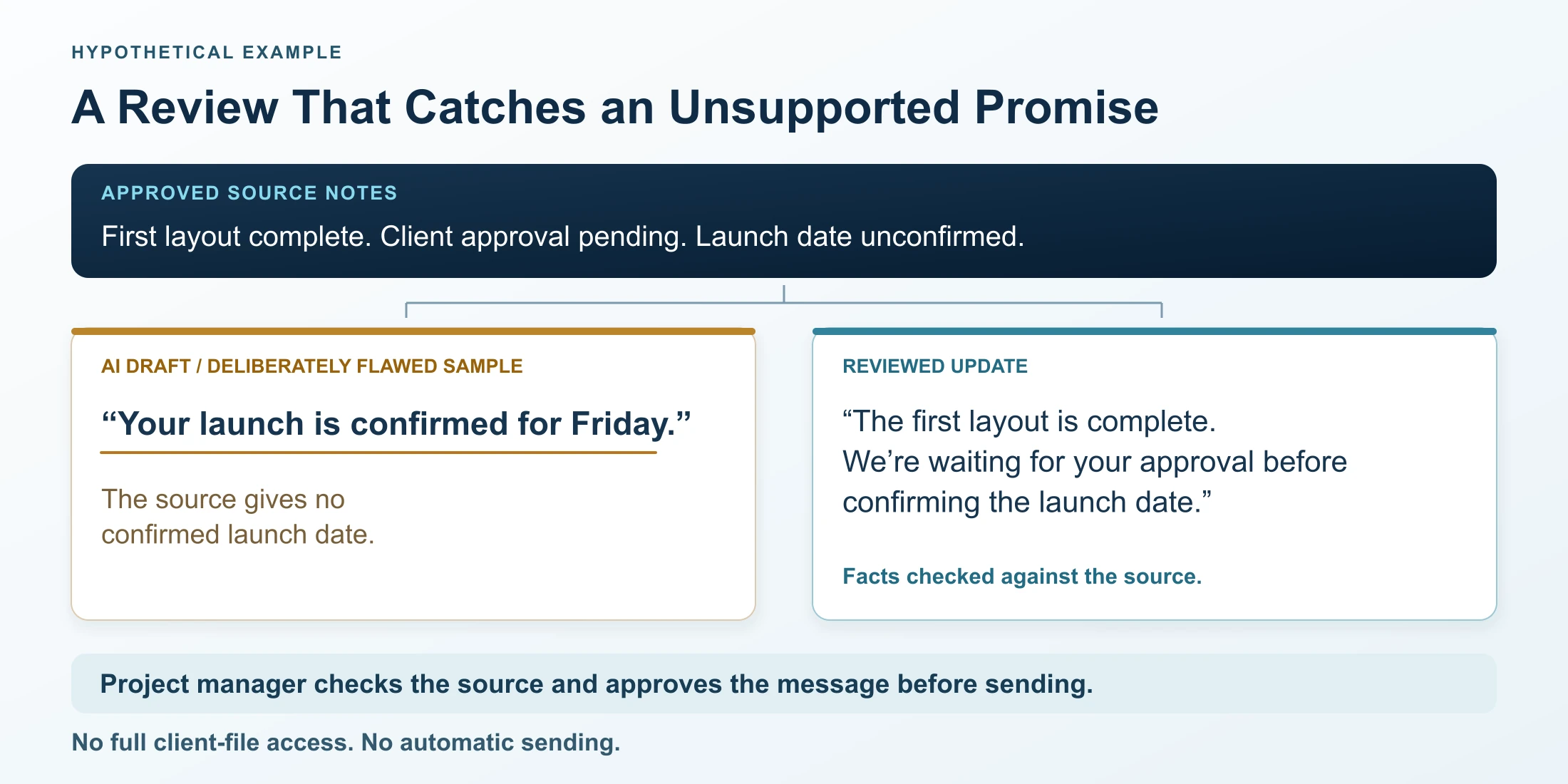
A coordinator writes a short brief outside the AI tool: “First layout complete. Client approval pending. Launch date unconfirmed.” The assistant gets that brief and the agency’s tone guide. It has no folder access and can’t send email.
Suppose the draft says, “Your launch is confirmed for Friday.” (This error is inserted to show the review step; it isn’t a test result.) The project manager checks the source, sees no confirmed date, and corrects the line before sending the email manually.
The register also sets the limit: approval for status updates doesn’t let the assistant search client files or agree a new deadline. For choosing and testing your first AI process, see our small-business AI implementation roadmap.
Respond to Problems and Keep the Rules Current
Staff need a reporting route before anything goes wrong. Breaches are expensive at any size: IBM’s Cost of a Data Breach Report 2026 puts the global average at $4.99 million, up 12% on the prior year.
If someone uploads the wrong file or spots an unexpected action, pause the workflow, tell the named contact, and record the tool, account, time, and data involved. The owner then limits further access, contacts the vendor, and brings in privacy or legal help to check any notification duties. Deleting a chat doesn’t prove the exposure is undone.
Review each approved use on its set date, and sooner after a new tool, wider permissions, different data, or a vendor terms change. That is AI governance for small businesses in practice: AI risk management sized for a team without a compliance department.
Put Your First Approved AI Use in Writing
Responsible AI use starts with one task your team can check reliably. Name its owner and reviewer, record the exact tool and account, list the permitted inputs and actions, and publish the reporting contact. Practice with invented data before using live records. To see where your team stands first, take our 5-minute AI readiness audit.
Good AI governance for small businesses grows one approved use at a time. Once the first task runs cleanly for a few weeks, add the next under the same rules.
Mental Forge helps North Texas businesses connect AI to existing workflows and train teams to use it safely. Bring one recurring task, the tools it touches, and the type of data it uses, and we’ll help you set permissions, review steps, and training. Discuss your AI workflow with Mental Forge.