
A few people on the team use AI for emails, and meeting notes are summarized faster. Yet enquiries still sit in an inbox, and information is copied between systems. Understanding how to implement AI in a small business starts with deciding which of these everyday workflows should be improved first.
That is where an implementation plan becomes useful. If you are wondering how to implement AI in a small business, the starting point is one recurring workflow: a clear task, an agreed result, approved information, a limited test, and someone responsible for it.
The roadmap below follows that process through testing, team training, and measurement. A first project can stay small enough to understand while still addressing work that matters every week.
What AI Implementation Actually Involves
AI implementation is the work around the tool: deciding where it belongs, connecting it to the process, checking its output, and making it usable by the team.
Three terms are worth separating. AI assistance might produce a draft reply. Automation carries out predefined steps, such as assigning an enquiry to a queue. Integration connects capabilities with the systems where work already happens.
These can be combined, but AI is not needed for every repetitive task. A fixed appointment reminder may only require a rule. An enquiry that needs to be summarized and answered in context may benefit from AI.
Mental Forge’s AI integration services address how those capabilities fit into existing business workflows.
Step 1: Identify One Workflow Worth Improving
A useful first project is frequent, clearly bounded, and easy to check. Its value should be visible to the people doing the work. A list of recurring tasks is more useful here than a list of fashionable tools.
|
Possible Workflow |
Potential Value |
What Needs Checking |
|---|---|---|
|
Drafting enquiry replies |
Less repeated writing |
Facts, tone, and commitments |
|
Turning meeting notes into actions |
Less manual sorting |
Owners, dates, and missing context |
|
Classifying incoming messages |
Easier routing |
Urgent or misclassified messages |
The first task should also have a named owner. Someone needs time to answer questions, review results, and decide whether the process is improving. If nobody can take that role, the scope may need to shrink.
For a broader starting-point check, Mental Forge’s AI readiness audit covers team capacity, workflow clarity, leadership, and current tools.
Step 2: Record the Current Process and Define Success
Before anything changes, the current workflow should be written down: what starts it, what information is needed, who handles each step, and what a satisfactory result looks like. Delays and repeated corrections belong in that description too.
A baseline gives the pilot something meaningful to beat. For a representative sample, record:
Staff time per task, including review and corrections.
Weekly volume and the time work spends waiting.
Common errors, missing details, and repeat work.
A goal such as “better customer service” is difficult to evaluate. A more useful pilot target might be lower handling time while factual accuracy and response quality remain acceptable. The actual threshold should be agreed for that business before testing begins.
The result of this step is a short process map, a baseline, and a written definition of success.
Step 3: Prepare the Information and Set Review Rules
A draft can sound confident while containing the wrong service area, price, or availability. Approved reference information is therefore part of the setup. Old policies, duplicate files, and conflicting instructions should be resolved before they become inputs.
The team also needs to know which information may be shared with the selected tool. Vendor retention, access, and model-training terms should be checked for the specific product and account. Privacy settings are not interchangeable across every AI service.
Review rules should identify who approves the output and which situations return directly to staff. For a first enquiry workflow, that could include complaints, missing information, or requests for an unapproved commitment.
The NIST AI Risk Management Framework offers voluntary guidance for managing AI risks. A small pilot still needs practical controls, even when a large governance program would be disproportionate.
Step 4: Choose Tools That Fit the Existing Workflow
The software already used by the business is a sensible place to investigate. An existing capability may be sufficient, but its availability, permissions, and limits still need checking. A separate tool should earn its place by solving a defined gap.
A useful comparison covers the following questions:
Does it work with the current email, CRM, or document system?
Can the task be completed with appropriate data controls and human approval?
Who will maintain it, and what happens when something fails?
What are the setup, subscription, training, review, and support costs?
A standalone assistant may suit occasional drafting. Repeated work across several systems may need connected AI automation. Custom connections, sensitive information, or complex exceptions can justify specialist implementation support. When deciding how to implement AI in a small business, existing systems, data sensitivity, and the team’s ability to maintain the process all need to be considered.
Step 5: Test a Small Pilot Before Wider Use
The pilot should cover a defined task, limited access, and representative work. Early testing can use synthetic or appropriately anonymized examples. Any later trial with live information needs the approved data controls in place.
Typical cases alone will not reveal enough. Missing fields, unusual requests, unclear wording, and contradictory information should be included. The test is partly about whether the system recognizes when it should stop and ask for help.
Each output should be checked against the agreed standard. Accuracy, completeness, tone, corrections, and total staff effort matter more than whether a demo looks impressive. The trial needs enough relevant cases to judge these points; a fixed number of days does not guarantee that.
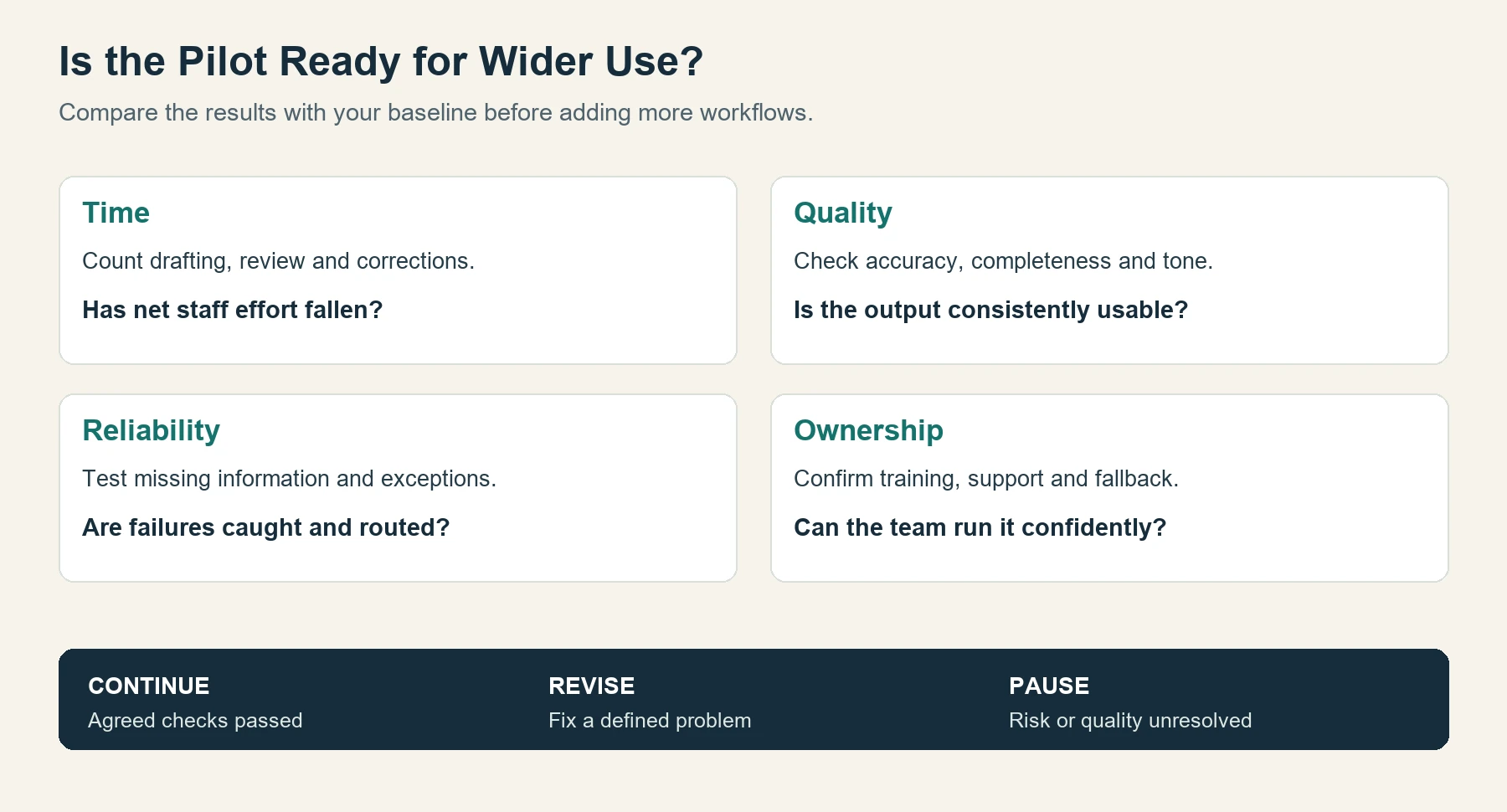
At review, the decision is to continue, revise a defined problem, or pause. Wider use should wait until the agreed checks have been met.
Step 6: Train the Team and Document the Workflow
Training is most useful when it follows the work people actually do. A coordinator needs practice reviewing enquiry drafts, recognizing mistakes, and handling exceptions. A general introduction to AI is unlikely to answer all those questions.
A short shared guide should explain the trigger, approved inputs, review checklist, owner, backup, and fallback process. It should also show where errors are recorded and how the workflow can be paused.
The Tennessee Small Business Development Center recommends small, practical uses with human review and reusable templates. Those habits make a useful foundation for team adoption.
Where employees need more confidence with practical AI tasks, Mental Forge’s Fusion Foundations workshops provide a training option. The documented workflow should still be tested by the people expected to use it.
Step 7: Measure the Results Before Expanding
The original baseline should now be compared with the pilot. Review and correction time must be included; a draft produced in seconds offers little benefit if it needs lengthy repair.
For illustration, suppose 40 tasks are completed each week and five net minutes are saved on each, after review and corrections:
40 tasks × 5 minutes = 200 minutes, or approximately 3.3 staff hours recovered per week.
This is a hypothetical calculation, not a Mental Forge client result. Recovered time creates capacity, but it does not automatically reduce payroll. Cash savings depend on an actual cost change, while productive use of that capacity needs separate evidence.
Quality, reliability, staff adoption, and ongoing support should be reviewed alongside time. If the improvement holds up and ownership is clear, another workflow can be considered. If it does not, the right decision may be revision rather than expansion.
A First AI Workflow in Practice
Consider a hypothetical North Texas home-services business receiving website enquiries. Its coordinator repeatedly reads each message, identifies the requested service, and writes a reply asking for missing details.
A limited workflow could capture the form, summarize the request, and prepare a draft using approved service information. Staff would check the facts and tone before sending. Unusual requests would return to the coordinator without an automatic answer.
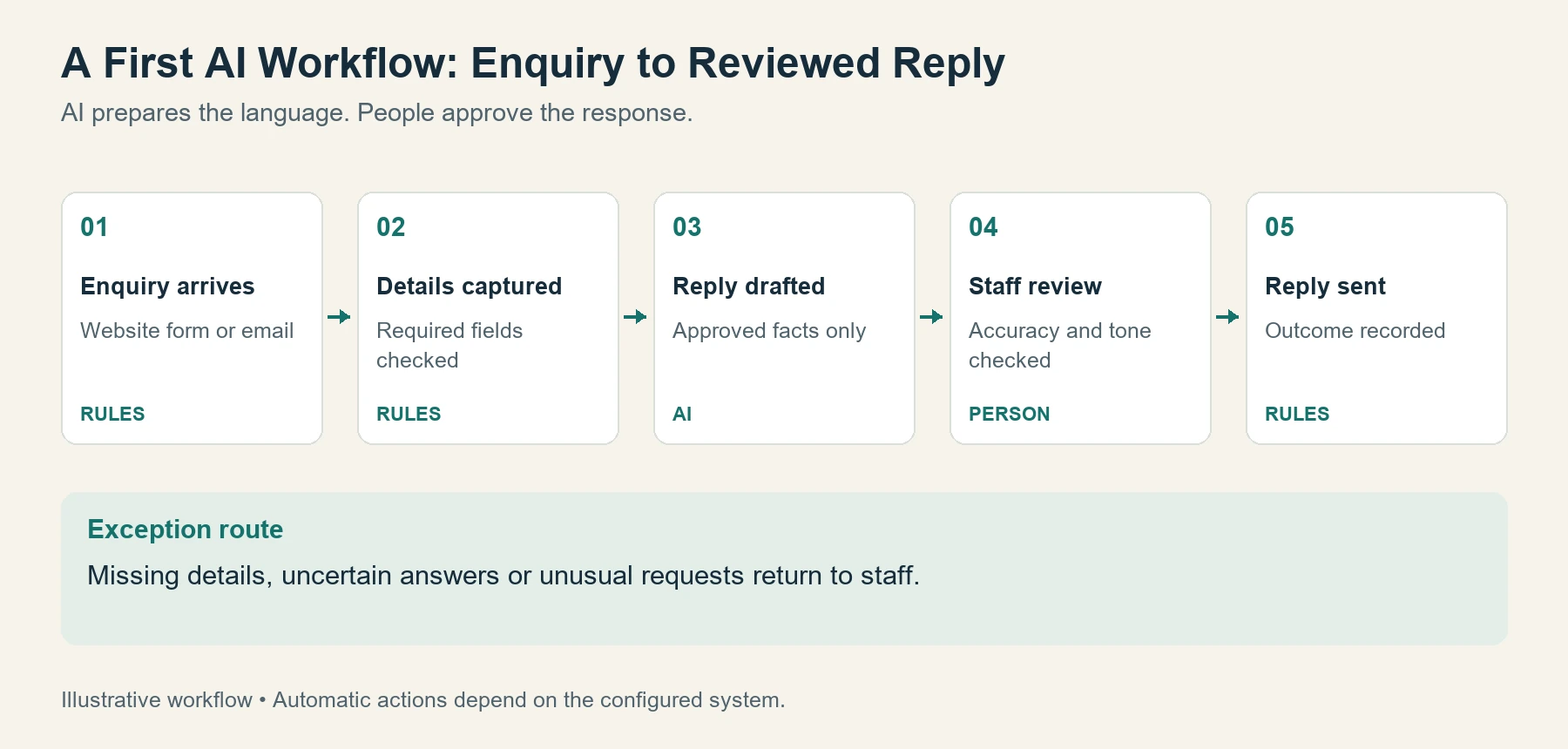
Form capture and routing may be ordinary automation. Summarizing the message and drafting the response are the AI tasks. Staff remain responsible for approval and for any pricing or scheduling commitments.
The pilot would measure handling time, corrections, and how reliably exceptions reach staff. That produces a more useful decision than simply asking whether the team liked the tool.
Frequently Asked Questions
Can a Small Business Implement AI Without Technical Staff?
Some drafting and summarization tools can be used by nontechnical teams. Connected systems may need additional support, especially where permissions, sensitive data, or complex exceptions are involved. The task determines the skills required.
How Long Does AI Implementation Take?
Scope, data preparation, integrations, testing, and staff availability determine the timeline. A narrow workflow may be ready sooner than a project spanning several systems. A dependable deadline needs an assessment of those dependencies.
How Much Should a Small Business Budget?
The budget should include licensing, configuration, integration, training, review time, and maintenance. A software subscription is only one part. Quotes are easier to compare when the workflow, deliverables, and support responsibilities are clearly defined.
Does Every Repetitive Task Need AI?
No. Predictable tasks with fixed rules may be handled by standard automation. AI may be useful where information needs to be interpreted, summarized, classified, or drafted, provided its output can be checked appropriately.
Put Your First AI Workflow on a Clear Plan
Understanding how to implement AI in a small business becomes easier when the first project is clearly defined. One recurring task, a responsible owner, and an agreed measure of success give an implementation conversation something concrete to work with.
Mental Forge helps North Texas businesses assess workflows, integrate AI, and prepare teams to use it. If the right first project is still unclear, bring the process that causes the most repeated work and discuss what a practical implementation plan could involve.