AI Automation for Dallas Small Businesses: Opportunities and Outcomes in 2026

A practical glance at where AI automation actually helps a Dallas small business, what results are realistic, and how to know when a workflow is ready to automate. Walk into almost any small business in Dallas right now and you will find someone already using AI for something. A contractor drafting an estimate email in half the time it used to take. An office manager cleaning up a spreadsheet before Monday’s meeting. A marketing hire knocking out social captions between calls. What is rarer is a system that runs on its own, with no one opening a tab or typing a prompt, while the owner is out on a job site or already on to the next thing. That gap, using AI by hand versus letting a workflow run itself, is where the real opportunity sits for Dallas small businesses heading into the rest of 2026. It is not a small gap either. A Small Businesses Voices survey fielded by Goldman Sachs in early 2026 found that 76 percent of small business owners are now using AI in some form, and 93 percent of those users say it has made a real difference. Only 14 percent said AI is actually built into their core operations. Most owners, in other words, are still doing the typing themselves. That is not a knock on anyone. It is just where things stand right now, and it is exactly why automation, not just AI use, is the next real move for small businesses across Dallas. What Automation Actually Means (and What It Doesn’t) Opening a chatbot to draft an email is AI assistance. A person still decides to do the task, opens the tool, writes the prompt, and reviews the output every single time. That is useful, but it is not automation. It still depends on someone remembering to do it. Automation means the task runs without that person in the loop for every instance. A new lead fills out a form, and a follow-up text goes out within a minute, without anyone having to see the form first. An invoice arrives by email, and the numbers land in the accounting system without anyone retyping them. The trigger happens, the system acts, and a human steps in only where judgment is genuinely needed. It also helps to separate a few terms that get used loosely. Rule-based automation follows a fixed script: if a lead comes from this source, send this exact message. It is reliable but rigid. AI-powered automation adds judgment: the system reads a lead’s message, decides which of several follow-ups fits, and drafts a reply in the business’s own tone. Agentic workflows go a step further. Instead of one AI call producing one output, the system works through a sequence: it checks the CRM for prior contact, cross-references availability, drafts a reply, and flags anything unusual for a person to approve before it goes out. The system decides how to reach the goal instead of following one fixed path. None of this makes an AI subscription an automation strategy on its own. How AI Automation Works walks through this in plain terms: the value comes from connecting a trigger, a decision, and an action, not from adding another AI tool to a growing list of subscriptions. Where the Real Opportunity Sits for Dallas Small Businesses Automation opportunities are not the same for every business. Dallas’s mix of home services companies, healthcare practices, professional firms, real estate offices, and growing e-commerce brands means the right starting point depends on the workflow, the volume of repetitive work, and what software is already in place. A few patterns show up often enough to be worth walking through. Lead response and follow-up Many Dallas service businesses lose leads simply because a call or web form comes in after hours, or because follow-up depends on whoever remembers to do it. When lead volume is high enough that response time changes whether you win the job, an automated sequence that captures the lead, sends an immediate reply, and schedules follow-up touches removes the dependency on any one person’s memory. The workflow still needs a human step for anything outside the routine case, such as a large commercial inquiry that deserves a phone call instead of a text. Scheduling and front-desk work Healthcare practices, home service companies, and professional offices all field a steady stream of the same handful of questions: hours, pricing ranges, appointment openings. A system that answers those directly and books straightforward appointments frees front-desk staff for the calls that actually need a person, such as a patient with a complicated question or an unhappy customer. This only works well when the underlying scheduling data is accurate. An automation built on a messy calendar just automates the mess faster. Document and data processing Invoices, intake forms, permit paperwork, and inspection reports are common across Dallas’s contractor and home services market, and most of that data still gets retyped by hand somewhere. Structured data extraction can pull the relevant fields from a document and route them into a CRM or accounting system, cutting the manual entry step. Someone still needs to spot-check the output, especially early on, since extraction accuracy depends on how consistent the source documents are. Internal reporting Pulling numbers together for a weekly ops review or a monthly owner meeting is repetitive and rarely difficult, which makes it a good automation candidate. A system that compiles figures already sitting in a CRM, accounting software, and ad platforms into one weekly summary saves the hour or two someone currently spends assembling it by hand. Someone still needs to read the report and decide what to change. None of these examples require rebuilding a business’s technology from scratch. In most cases, the tools are already in place. The gap is a connected workflow, not new software. What Changed by 2026 The technical shift worth understanding in 2026 is the move from single-step AI tools to multi-step agentic workflows. A basic chatbot answers one question and
What Does AI Automation Actually Cost for a Small Business? (Texas Breakdown)

Before putting money into an AI automation project, there are two numbers worth knowing: what it will cost to build and what it will cost to keep running. Those figures are not always obvious from a software subscription page or a service provider’s quote. For a small business, understanding both can make the difference between a useful investment and an expensive experiment. The pricing really does vary, and it varies for legitimate reasons. A roofing company in Denton automating after-hours lead capture is not buying the same thing as a Dallas professional services firm building a connected client intake and reporting system. Lumping those together under one price range is not useful to either of them. What follows is a breakdown of what actually drives AI automation cost, what realistic numbers look like at different levels of complexity, and a straightforward way to decide whether any of it makes financial sense for your business. What Are We Actually Talking About Price-Wise? Current market data puts most small business AI automation projects somewhere between $1,500 and $25,000 for the initial build, with ongoing monthly costs generally running $100 to $2,000 after that. Those numbers look wide because the work is genuinely different at each end of the range. Platforms like Make, Zapier, and n8n handle straightforward automations at the lower end. Custom-built AI systems with multiple integrations sit firmly at the top. A single workflow, automating missed call text-backs for instance, involves a few tools, one clear trigger, and a defined outcome. That is a contained project. A system that captures leads from multiple channels, runs them through an AI qualification layer, books appointments, updates your CRM, and emails a job summary to your team each morning is a substantially larger piece of work. Both are AI automation for a small business. The cost difference between them is real and justified. The more useful framing is not “what does AI automation cost?” but “what does automating this specific workflow in my business cost?” That shift in the question changes how you evaluate what you are being quoted and whether the scope you are buying is actually matched to the problem you have. The Variables That Move the Price Understanding what drives cost matters more than any single number. These are the factors that consistently affect what a project ends up running. Number of workflows. Each additional process you want to automate adds to the scope. One workflow is a focused project. Three or four workflows that need to work together is a more involved engagement, and the complexity compounds as they interact with each other. Workflow complexity. A straight-line automation moves information from one place to another. A complex one makes decisions along the way. If the job type is X and the customer is in a certain service area and they have not responded in 48 hours, then escalate it differently. Every conditional branch in the logic adds build time and creates more to test before the workflow goes live. Software integrations. Connecting two tools is a different job than connecting six. Many Texas home service businesses run on a combination of a CRM, scheduling software, a field service app, a quoting tool, and separate invoicing. Getting those systems to pass data between each other reliably adds meaningful work to the project. Whether AI is actually involved. Some automation is purely mechanical, routing data and triggering actions based on rules. Bringing a language model into the workflow to interpret messages, draft responses, summarize documents, or score leads adds capability but also adds per-use API costs on top of whatever platform fees are already in the picture. If you are evaluating tools, OpenAI’s API pricing page gives you a sense of how those costs scale with volume. Higher usage means higher ongoing bills, which is worth knowing before you build a high-volume workflow around an AI component. Custom development. Standard no-code tools cover a lot of ground without requiring custom code. That changes when your business runs on older software, an industry-specific platform, or something that does not have a standard API connection. Custom development is sometimes unavoidable, and it pushes cost up. Data quality. This is the cost that almost no one budgets for. If your contact records have duplicates, inconsistent formatting, missing fields, or data spread across systems that have never talked to each other, that cleanup has to happen before any automation can be built reliably on top of it. Skipping it is one of the most common reasons automations underperform after launch. Maintenance. Third-party tools update on their own schedules. When a platform changes its API, a workflow that was running cleanly can break quietly, not with a loud error, just with records that stop updating or follow-ups that stop sending. Ongoing maintenance, whether through a monthly retainer or periodic check-ins, is part of what it costs to keep automation working over time. Human review requirements. Some workflows should not run end-to-end without a person checking the output. A draft proposal that goes out to a commercial client probably needs a human eye before it sends. Building in those approval steps takes more design and testing up front, but removing them from workflows where they are genuinely needed creates a different kind of cost. Three Cost Levels and What They Actually Cover Single-Workflow Automation ($1,500 to $5,000 build, $50 to $200/month ongoing) This is a well-defined process with one trigger and a clear outcome. Missed call goes to a text-back. Form submission creates a CRM record and fires a follow-up email. A new invoice gets read and logged automatically. Two to four tools are involved, the logic is relatively linear, and the outcome is measurable within the first month. Most businesses should start here. Multi-Step Business Automation ($5,000 to $15,000 build, $200 to $800/month ongoing) This involves several connected tools, conditional logic, and often an AI step in the middle. A lead comes in, gets scored, enters a follow-up sequence based on job type, books an
AI Automation for Healthcare Practices in Texas: Use Cases & Outcomes

A mid-size healthcare practice in Texas runs on more than exam rooms and appointment slots. Someone is booking calls, verifying insurance, chasing referrals, updating records, and answering the same five questions on the phone every day. None of that work touches a patient directly, and all of it competes for the same hours as patient care. That gap is why AI automation for healthcare practices in Texas has become a serious operational question rather than a buzzword. Used carefully, automation can absorb the repetitive parts of practice operations while keeping clinical judgment exactly where it belongs, with licensed staff. This guide looks at where AI automation realistically fits inside a Texas healthcare practice, what outcomes are reasonable to expect, and what privacy and regulatory considerations apply before any automation touches patient data. What Does AI Automation Mean for a Healthcare Practice? Ordinary software automation follows fixed rules and repeats the same action every time a condition is met. Generative AI chatbots respond to open-ended prompts but usually don’t connect to other systems. AI automation sits between the two, using AI to interpret incoming information, then triggering the right action across the tools already in place, the EHR, the phone system, the scheduling calendar, without re-entering the same data three or four times. Healthcare has a lower tolerance for gaps between automated input and human oversight than most industries. A missed follow-up in retail costs a sale; in a medical practice, it can affect someone’s care. Every automated workflow here needs a clear path back to a person, and nothing in this article replaces clinical judgment. The workflows below cover administrative tasks such as scheduling, documentation routing, communication, and internal coordination. None involve diagnosis or treatment decisions. Key AI Automation Use Cases for Texas Healthcare Practices Most practices don’t automate everything at once. They start with the workflows that eat the most staff time and carry the least clinical risk, then expand from there. Appointment Scheduling and Patient Communication Scheduling is usually the first workflow practices automate. An automated system can field appointment requests, send reminders, handle rescheduling, and answer common scheduling questions any time of day, not just during office hours. The key design choice is the escalation path. Anything outside a standard scheduling request, a symptom question, an urgent concern, should route straight to staff. A Texas dental clinic worked with Mental Forge on exactly this, using an AI receptionist to capture after-hours enquiries that were going to voicemail and turning them into booked appointments. Patient Intake and Administrative Data Handling Intake forms generate a lot of manual re-entry, someone reads a paper or PDF form and retypes it into the practice management system. Automation can pull structured fields, name, insurance ID, reason for visit, contact information, straight into the right record and flag anything incomplete for staff review. AI routes and organizes intake information; a nurse or provider still interprets it. Referral and Document Workflow Automation Referrals arrive by fax, email, and portal upload, often in inconsistent formats. Automation can scan incoming documents, identify the referring provider and patient, route the file to the right queue, and send a confirmation back to the referring office, cutting the time a referral sits untouched in a shared inbox. Staff still review the clinical content and make scheduling and care decisions; automation only handles routing and notification. Insurance and Administrative Workflow Support Insurance verification and prior authorization involve a lot of status checking and follow-up that eats staff time without requiring much judgment. Automation can collect the needed information upfront, track where a request stands, and prompt staff when a follow-up is due. It cannot guarantee an approval or predict a payer’s decision, and practices shouldn’t present it that way to patients. What it can do is cut down on the number of times staff manually check a portal or call a payer for a status update. Patient Follow-Up Workflows Post-visit follow-up, appointment reminders, care instructions, and satisfaction check-ins are a natural fit for automation because the messages are largely consistent across patients, with escalation built in for anyone who responds with a concern. A practice can automate the outbound message and initial response handling while routing anything that reads like a clinical question straight to a nurse line. Automated follow-up should never be the only channel a patient has back to the practice. Once a practice sees how these first few workflows perform, the next step is usually mapping which additional processes are worth automating and in what order. Mental Forge’s AI automation services are built around that kind of staged rollout, starting with a practice’s actual workflows rather than a generic package. Internal Staff Communication and Task Routing Between the front desk, billing, clinical staff, and management, a lot of internal coordination still happens through hallway conversations and sticky notes. AI automation can route tasks to the right person, flag when something is overdue, and summarize what happened during a shift so the next team isn’t starting cold. It reduces coordination overhead without replacing the judgment calls that still belong to a supervisor or office manager. Documentation and Administrative Summaries Administrative documentation, meeting notes, SOP updates, shift handoff summaries, operational reports, takes real time to write well. AI can draft a first version from raw notes or a recording, which staff then review and finalize. Clinical documentation is a different matter; it carries its own regulatory requirements and needs a clinician confirming accuracy before anything enters the medical record. Front-Desk and FAQ Support A large share of front-desk calls and messages are the same handful of questions, office hours, parking, what to bring to a first visit, whether a plan is accepted. Automation can answer these directly and immediately, freeing front-desk staff for calls that need a person. The system should draw a clear line between general practice information and medical advice, and it should never attempt to answer a clinical question. Staff Onboarding and SOP Access New hires spend a lot of their first weeks asking where
AI Lead Follow-Up Automation: Stop Losing Prospects After Hours

A prospect fills out a form at 9 PM. Or on a Saturday afternoon. Or during a holiday week when the office is closed and nobody is checking the shared inbox. If that inquiry sits untouched until Monday morning, there is a real chance the person has already called someone else, or simply moved on. This is not a hypothetical. It happens every week in businesses that rely entirely on staff availability to catch new leads. AI lead follow up automation exists to close that gap. It gives a business a way to respond to inbound interest the moment it arrives, whether that is 2 PM on a Tuesday or 11 PM on a Friday, without needing someone at a desk to make it happen. What Is AI Lead Follow-Up Automation? At its core, AI lead follow up automation is a system that reads incoming lead information, understands enough about the context to respond in a relevant way, and moves the conversation forward without a person manually typing every message. This is different from a basic autoresponder. A standard autoresponder sends the same canned message to every submission, regardless of what the prospect asked or needs. AI-driven follow up reads what the lead actually wrote or selected, pulls in relevant details from the CRM or intake form, and shapes a response around that specific inquiry. If someone asks about pricing for a particular service, the reply addresses that service. If someone mentions a timeline, the system can factor that into scheduling or routing. The workflow typically connects to systems the business already uses, a CRM, a scheduling tool, an inbox, or a messaging platform. When a new lead is captured, the automation can log it, tag it, trigger a response, and update records as the conversation develops. None of this replaces the sales process. It sits ahead of it, making sure a lead is engaged and organized before a person ever needs to step in. Why Businesses Lose Leads After Hours Most businesses do not lose leads because their offer is weak or their pricing is off. They lose leads because nobody responded in time. A few patterns show up again and again: None of these are dramatic failures. They are ordinary operational gaps that show up in almost every business that takes in leads from a website, an ad, or a form. The cost isn’t one lost deal. It’s a slow, steady leak of prospects who were interested enough to reach out and never heard back quickly enough to stay interested. How AI Lead Follow-Up Automation Works A workable version of this system follows a fairly consistent shape, even though the details change from business to business. A lead arrives through a form, a chat widget, an ad platform, or an inbound call transcript. The system captures whatever information came with it: name, contact details, the specific question or interest expressed. From there, it assesses the lead against criteria the business has already defined, budget range, service type, location, timeline. Based on that assessment, the AI sends a first response that speaks directly to what the person asked about. If the conversation continues, the system keeps qualifying, asking one or two follow up questions rather than a long intake form disguised as a chat. Once enough is known, the lead gets routed, either to a specific salesperson, a department, or a scheduling link. If the lead needs judgment, a complicated question, a sensitive negotiation, a person takes it from there. Throughout all of this, the CRM gets updated automatically, so nothing depends on someone remembering to log the interaction later. Not every business needs every stage automated. A service business with a simple booking flow might only need instant response and scheduling. A B2B company selling a more complex product might need deeper qualification before a person ever gets involved. The shape of the workflow should match how the business actually sells, not a generic template. Businesses that want to see this approach applied in practice can download the case study covering how a similar workflow was built and deployed for a real client. Where AI Lead Follow-Up Adds the Most Value Instant acknowledgment The biggest shift is a simple one: something happens right away. A prospect who submits a form at midnight gets a relevant reply within seconds, not a form-confirmation page and silence until the next business day. Qualification without a long form Instead of asking a prospect to fill out fifteen fields upfront, the AI can gather what it needs conversationally, a question or two at a time, which tends to get more completed responses than a wall of required fields. Personalized replies Because the system reads what the prospect actually submitted, the first message can reference their specific situation instead of opening with something generic. Scheduling assistance For businesses where the next step is a call or consultation, the AI can offer available times and confirm a booking directly inside the conversation. Lead routing Qualified leads get sent to the right person or team automatically, based on service type, location, or deal size, instead of sitting in a queue waiting for manual triage. Follow up sequences When a prospect doesn’t respond to the first message, the system can send a reasonable, spaced-out sequence rather than one message and silence, or a barrage of daily nudges. CRM updates Every exchange gets logged automatically, so a salesperson picking up the conversation later has full context instead of a blank record. Re-engaging older leads Rather than messaging every lead in the database at once, the system can flag leads that match new criteria, a service that just launched, a seasonal offer, and follow up only where it’s actually relevant. After-hours coverage This is the piece that solves the original problem directly. Evenings, weekends, and holidays stop being dead zones where inbound interest goes unanswered. A Realistic Example A prospect submits an inquiry through a website contact form at 9:40 PM on a Friday, asking about availability for
AI Tech Stack for Service-Based Businesses: What to Build in 2026
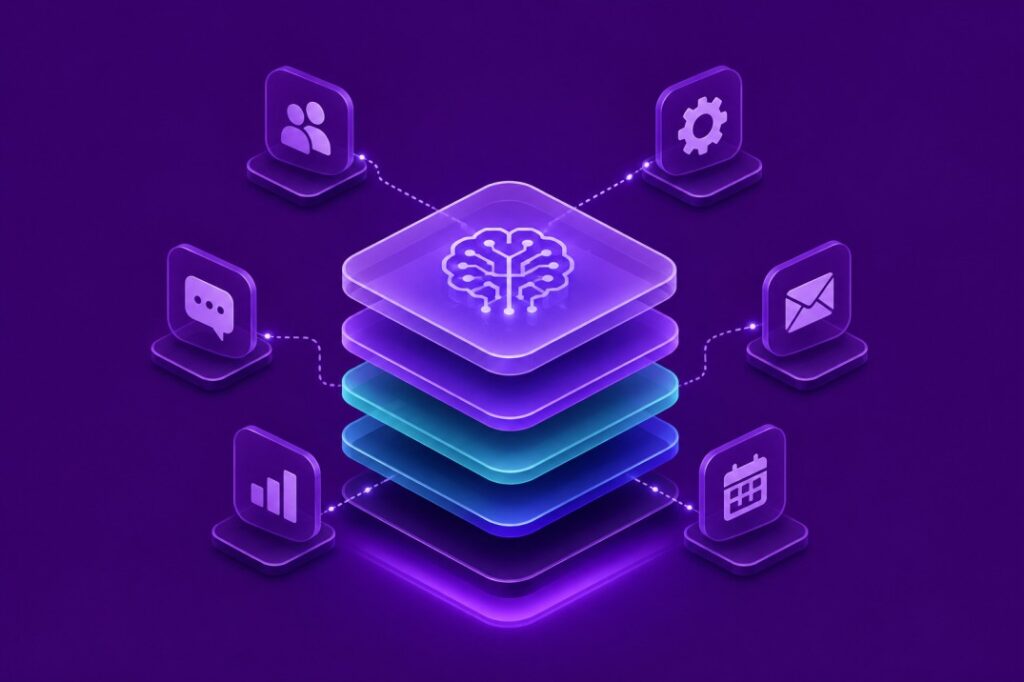
In 2026, the most successful businesses aren’t those with the most AI tools. They are the ones whose tools work together. A law firm with six separate AI tools for intake, drafting, and scheduling spends too much time fixing manual errors. For agencies, contractors, healthcare practices, and professional firms, AI only provides a real advantage if it is a connected system, not just a collection of apps. This guide explains what an AI tech stack is and why service businesses need one by 2026. It covers the core components to build and provides a realistic roadmap to avoid overspending or overwhelming your team. What Is an AI Tech Stack? An AI tech stack is a connected set of AI tools and platforms. It includes the integrations, data flows, and rules that let these tools work as one system. It replaces the old model of static software—like a basic CRM, email client, and spreadsheet. In a dynamic stack, AI actively processes data, makes decisions, and moves work between systems. This distinction is vital for service businesses. SaaS companies build AI into their products from the start. However, service businesses—like clinics or marketing agencies—add AI to existing operations. They must work around real limits: old data, non-technical staff, the need for a human touch with clients, and tight budgets. This requires a specific strategy that actually works in 2026. Why Service-Based Businesses Need an AI Tech Stack in 2026 Research on Small business technology adoption shows that AI use among U.S. small businesses grew from about one-third in 2023 to nearly 90% by early 2026. AI is now a standard part of operations for most small and mid-size businesses. Service businesses adopt AI quickly because their profits depend directly on labor hours. A connected AI tech stack improves five key areas: Most businesses are still beginners. SMB surveys show that fewer than one in ten businesses have advanced AI adoption. Most only test a few tools without a plan. A deliberate AI tech stack helps you beat competitors who are still just experimenting. Core Components of an AI Tech Stack Think of the stack in four layers: client-facing systems, internal operations, content and communication, and the intelligence layer layer that ties everything together. Client-Facing Systems: CRM, Scheduling, and Customer Support Automation The CRM is the backbone of the stack for most service businesses, and in 2026 that means an AI-enabled CRM that can score leads, draft follow-up messages, and trigger next steps automatically rather than sitting as a static database. Paired with AI scheduling, which reduces no-shows and removes back-and-forth emails, and AI-assisted customer support, chat and email triage that routes or resolves routine questions, this layer directly reduces the response-time gap between your business and the client’s decision window. The common integration pattern connects the CRM to your scheduling tool and your support inbox so a new lead, a booked appointment, and a support ticket are all visible in one place, not three. Internal Operations: Workflow Automation, Document Processing, and AI Assistants Workflow automation platforms, connecting apps so an action in one system triggers a task in another, are what turn a stack from a set of tools into a system. Document processing AI handles contracts, intake forms, and invoices without manual data entry. AI assistants, used well, function less as chatbots and more as a layer that drafts, summarizes, and prepares work for a human to review and approve. The best practice here is starting with the highest-friction manual task first, usually intake, invoicing, or reporting, rather than automating everything at once. Content and Communication: Email Automation, Meeting Intelligence, and Proposal Generation Service businesses lose enormous time to written communication. Email automation drafts and personalizes routine responses. Meeting intelligence tools convert calls and meetings directly into action items and follow-up notes, removing the 30 to 45 minutes most people spend on post-meeting admin. Proposal generation, when built around a documented process rather than a blank prompt, turns a task that used to take days into one that takes an hour without sacrificing quality. Marketing automation extends the same logic to campaigns, scheduling, and content calendars. The Intelligence Layer: Analytics, Reporting, Knowledge Management, and AI Search This layer is where most service businesses underinvest. Analytics and reporting tools that pull data automatically from your CRM and operations systems give owners a real-time view instead of a monthly spreadsheet reconciliation. Knowledge management systems, a searchable internal library of processes, past proposals, and client history, paired with AI search and retrieval, let staff find answers in seconds instead of interrupting a manager. Together, these tools are what let a stack compound in value over time rather than staying static. How to Build Your AI Tech Stack Building a stack is a sequencing problem more than a shopping problem. A practical roadmap looks like this: If your business is at the point where the roadmap above raises more questions than it answers, that is the normal stage to bring in outside help rather than a sign you are behind. Book a consultation to walk through your current workflows against this framework. It is a faster path to clarity than testing tools one at a time. Common Mistakes Businesses Make The businesses that struggle with AI adoption tend to make the same handful of mistakes: Future Trends for AI Tech Stacks Beyond 2026 A few developments are worth planning around, even if they are not yet mainstream for most service businesses: None of this requires a business to overhaul its stack today. It is a reason to build the current stack on integrations and data practices that will still make sense as these capabilities mature, rather than on isolated tools that will need to be replaced. Putting All Togather A modern AI tech stack is not a list of software subscriptions. It is a connected system built around your actual bottlenecks, sequenced deliberately, and adopted by a trained team. Service businesses that treat AI as a strategy question, not a shopping list, are the
How to Create On-Brand AI Content at Scale Without Losing Your Voice

Picture two emails sitting in a customer’s inbox, both from the same company, sent a week apart. One sounds confident, conversational, and unmistakably human. The other reads like it was drafted by a committee that had never met the brand. Both were produced using the same AI tool. The difference was not the technology. It was whether the business had built a system to govern how that tool communicates on its behalf. That gap, between fast AI output and consistent brand communication, is one of the most underestimated operational challenges facing content teams today. Scaling AI content production is straightforward. Scaling it while preserving everything that makes your brand recognisable to your audience is a different problem, and it requires deliberate infrastructure rather than good intentions. What AI Content Scale Actually Does to Brand Identity When businesses begin producing content at volume with AI tools, three patterns tend to appear within the first few months. The first is tone drift. Without specific guidance embedded in prompts and workflows, AI tools default to a generalised professional register. It is technically correct. It sounds like your industry. But it does not sound like your company, and customers who have read your previous content will sense the shift even if they cannot name it. The second is channel fragmentation. Social copy, blog posts, customer service replies, and email campaigns each get handled by different team members using different prompts. The result is a brand that speaks with four distinct personalities across four channels simultaneously, which steadily erodes the consistency that builds audience trust. The third is editorial collapse. Volume increases faster than review capacity, so the quality check that catches voice problems before publication gets shortened or skipped entirely. Once that happens, inconsistency compounds with each content cycle. None of this is caused by AI being unsuitable for content work. It is caused by deploying AI at speed before defining what consistent, on-brand output actually looks like. Figure 1: The Three Failure Modes of Unguided AI Content at Scale What “On-Brand AI Content” Actually Means Clarity on this point matters before anything else, because businesses often measure the wrong thing. On-brand AI content is not content that sounds human-written. That framing distracts from the real goal. On-brand AI content is content that sounds like your specific business, reflecting your values, your relationship with your audience, and the distinct personality your brand has developed over time. Whether a human or an AI tool produced it is irrelevant to your customer. This means on-brand quality has three measurable dimensions. The content sounds like you, meaning tone and vocabulary match your established voice. It communicates the right things, meaning messaging reflects your positioning and priorities. And it fits the channel, meaning register adapts appropriately without abandoning the underlying personality. When all three are present, AI-assisted content becomes indistinguishable from your best human-written work. When any one is absent, customers sense the inconsistency even if they cannot pinpoint where it comes from. Why Most AI Content Processes Break Down The most common failure points are specific and avoidable once you know what to look for. Starting without a documented voice standard. A brand guide filed in a shared drive that nobody references is not a working system. Voice standards need to live inside the tools and workflows your team uses daily, translated into prompt language that AI tools can act on consistently. Writing prompts from scratch each time. Generic prompts produce generic content. When every team member improvises a prompt for each content task, output quality becomes entirely dependent on that individual’s understanding of the brand, which varies significantly from person to person and day to day. Treating all content as carrying the same risk. A product FAQ and a response to a customer complaint demand entirely different levels of human involvement. Without a framework that distinguishes between them, teams either over-automate high-stakes content or fail to use AI fully on lower-risk tasks. Skipping the voice review layer. Grammar checks and factual accuracy reviews are not voice reviews. Catching tone drift before publication requires a separate, deliberate editorial pass with a clear standard to measure against, not a combined skim for surface errors. Building Brand Voice Architecture Before You Scale The most effective approach to on brand AI content at scale begins before a single prompt is written. It begins with what practitioners call Brand Voice Architecture: a structured, operational system that defines how your brand communicates and translates that definition into every workflow your content team runs. Mental Forge’s Brand Voice Architecture (BVA) service is built precisely around this challenge. The engagement starts with audience mapping and competitive voice differentiation, not generic adjective lists, but a specific understanding of what makes your communication meaningfully distinct from every competitor in the same conversation. From that foundation, the BVA process builds tone frameworks, vocabulary standards, and AI-ready content guidelines your entire team can apply consistently. Every content type gets its own calibrated guidance. Blogs sound like your brand. Emails sound like your brand. Customer service responses sound like your brand. The personality stays constant while the register adapts appropriately to each channel. A well-built voice architecture answers questions generic brand guides typically ignore. How does your brand handle technical complexity: do you explain it or simplify it? What emotional register belongs in customer-facing communications versus thought leadership? Which phrases has your brand avoided historically, and why? How should tone shift when addressing a frustrated customer versus a prospective one? Teams that build this foundation before scaling consistently report two improvements: AI prompts produce better first drafts because the guidance is specific and actionable, and editorial review moves faster because reviewers have a clear standard rather than relying on subjective instinct. Figure 2: Brand Voice Architecture — From Discovery to Deployment Is your current AI content process built on a documented voice standard? If your team writes prompts from scratch for each task and reviews output without a voice checklist, you are producing AI content without brand governance.
AI Automation for Home Services: Roofing, HVAC & Plumbing

There’s a number that matters more than almost anything else in this industry, and most owners have never actually measured it: the gap between the moment a customer reaches out and the moment someone from your company responds. Call it the response window. Everything else in this article, lead capture, scheduling, dispatch, follow-up, comes back to that one gap. Harvard Business Review audited thousands of companies’ web lead response times and found that only 37% responded within an hour, nearly a quarter took more than a day, and close to a quarter never responded at all. The average, among companies that did eventually respond, was 42 hours. That study wasn’t about home services specifically. Still, anyone running a roofing, HVAC, or plumbing company will recognize the pattern immediately, because the same gap shows up every single day between a missed call and a callback that comes too late. This is where AI automation for home services businesses earns its keep. Not as a way to sound more advanced than your competitors, but as a practical way to close that window so leads don’t sit around going cold while your team is out on job sites doing the actual work. A Realistic Look at What Happens Without It Picture a fairly ordinary Tuesday night. It’s 9:40 PM and a homeowner’s water heater has started leaking onto the garage floor. She pulls up Google, calls the first plumbing company on the list, and it rings through to a generic voicemail. She hangs up and calls the second one. Same thing. The third company has an after-hours answering service, but the person on the line has no idea what information to collect and just says someone will call back in the morning. By the time an actual person from any of these companies follows up, she’s already booked with a fourth company, one that happened to have a system that picked up immediately, asked the right questions, and got a technician scheduled for early the next morning. Nobody lost that job because of bad workmanship or a bad reputation. They lost it because of an operational gap that had nothing to do with skill. That gap is exactly what automation is built to close, and it’s a big part of why the labor side of this industry matters too. The Bureau of Labor Statistics projects roughly 44,000 job openings a year for plumbers, pipefitters, and steamfitters over the next decade, which tells you plainly that the people problem in this industry isn’t going away. Fewer available technicians means every single lead has to count more than it used to. What AI Automation Actually Looks Like Day to Day Skip the buzzwords for a second. In a real roofing, HVAC, or plumbing business, AI automation is software sitting between your customer and your team, handling the parts of the interaction that don’t require a judgment call. It answers the website chat and the phone at 2 AM. It asks the questions your best CSR would ask (what’s the issue, what’s the address, how urgent is it), and it writes that information straight into whatever system you already use, whether that’s ServiceTitan, Housecall Pro, Jobber, or FieldEdge. If the situation is genuinely urgent, it can text the on-call technician immediately instead of waiting for someone to check a shared inbox in the morning. That’s the whole idea. It’s not a replacement for your office staff. It’s the layer that makes sure nothing sits untouched between the moment someone reaches out and the moment a human actually engages with them. The reason this matters more now than it did five years ago comes down to expectations. Homeowners are used to ordering food, booking a haircut, and scheduling a rideshare without ever talking to a human, and they’ve quietly started expecting the same speed from the person fixing their furnace. A company that still relies entirely on a front desk answering calls nine to five isn’t just slower, it’s competing against businesses that have effectively removed the concept of “after hours” altogether. Where the Value Actually Shows Up Lead capture and first response. This is the piece that closes the response window described above. A chat or voice assistant greets the customer immediately, gathers the essentials, and logs it before your team even sees the notification. Appointment booking. Instead of a round of phone tag to find a time, the system checks technician location and availability and locks in a slot on the spot, syncing directly with your scheduling software. Customer communication. Reminders before the appointment, an update when the technician is on the way, a quick check-in after the job wraps up. Small touches, but they’re the ones that reduce no-shows and cut down on the “where’s my technician” calls to the office. Preliminary quoting. For predictable jobs, things like a standard HVAC tune-up or a straightforward water heater swap, automation can put a rough number in front of a customer immediately instead of making them wait two days for a callback. Anything nonstandard still needs a human to look at it. CRM updates. Every call and chat gets logged automatically, so nobody’s digging through sticky notes trying to remember whether a lead was already contacted. Review requests. A simple, well-timed automated request after a completed job tends to outperform manual asks by a wide margin, mostly because it actually happens every time instead of getting forgotten during a busy week. Follow-up sequences. A lead that doesn’t convert immediately isn’t dead. Automated follow-up can check back a few days or weeks later, something office staff rarely have the bandwidth to do consistently on their own. Dispatch coordination. Matching the right technician to the right job based on location and skill set cuts down on wasted drive time, which matters even more given how thin the technician pool has become industry-wide. Internal reporting. Daily job summaries, flags for leads that went unanswered too long, alerts when a job is running behind schedule, all compiled automatically instead
How to Integrate AI into Your CRM Without Breaking Your Operations
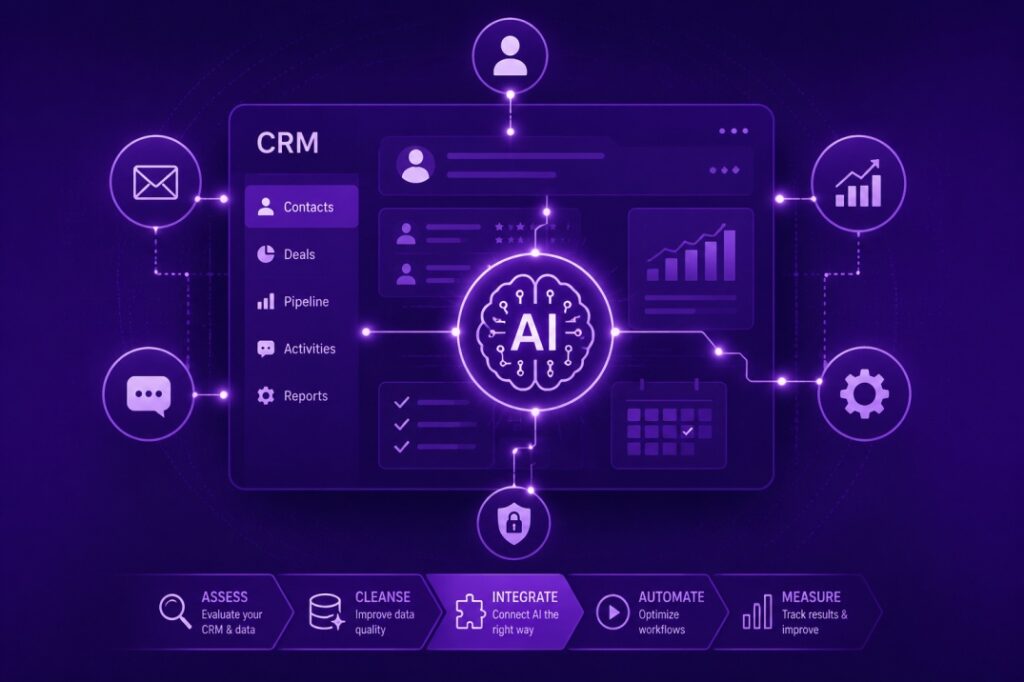
Your CRM is the operational center of your business. It holds your client history, tracks your pipeline, and is the system your sales and service teams rely on every day. When businesses decide to bring AI into that environment, the fear is understandable: what if something breaks, data gets corrupted, or the team stops trusting the system they depend on? Those concerns are legitimate. CRM integrations done poorly create exactly those problems. Done well, AI inside your CRM removes the low-value work that slows your team down, improves data quality rather than degrading it, and gives your operation visibility it did not have before. This guide covers what that process actually looks like: where to start, what to avoid, how to measure whether it is working, and the specific risks to manage at each stage. Why CRM AI Integration Fails: The Most Common Problems Before getting into implementation, it is worth understanding why these projects go sideways. The failure modes are consistent enough that they are worth naming explicitly. The first is treating AI as a data entry replacement before the data quality problem is solved. AI systems learn from the data they are connected to. If your CRM has duplicate records, inconsistent field usage, or outdated contact information, those problems do not disappear when you layer AI on top of them. They get automated. You end up with fast, confident bad outputs instead of slow, manual bad inputs. The underlying mess has to be addressed first. The second common failure is connecting too many tools at once. Businesses see the potential and try to integrate AI into their email system, their CRM, their scheduling tool, and their reporting platform simultaneously. The technical complexity multiplies, troubleshooting becomes difficult, and when something breaks, no one knows where to look. The third is skipping team involvement. The people who use the CRM daily know things about the actual workflow that no audit will surface. If they are not involved in the integration design, the system will be built around assumptions that do not match operational reality. Adoption fails not because the technology does not work, but because it does not fit how the team actually works. This is one of the reasons that AI integration consulting structured around discovery before implementation tends to produce better outcomes than vendor-led deployments. Assess Your CRM Before You Touch the AI Configuration The first practical step is an honest assessment of your current CRM state. This does not need to be a formal project. It is a set of direct questions about how the system is being used. Are records being updated consistently, or is data entry happening sporadically? Are your pipeline stages defined precisely enough that an AI system could interpret them correctly? Do you have a clear owner for the CRM, or is maintenance spread informally across the team? How many contacts in your database have been inactive for more than 18 months without being tagged or archived? If the answers to those questions reveal significant gaps, those need to be addressed before integration begins. A workflow audit at this stage often surfaces data quality issues that the team knew about but had not prioritized. Getting ahead of them before an AI build begins saves significant time downstream. Where AI Adds Real Value Inside a CRM Once the CRM is in a state where automation makes sense, the next question is where to start. The highest-value areas are consistent across most small and mid-size businesses. Lead Scoring and Prioritization Most CRMs allow for manual lead scoring, but few teams maintain it consistently. AI-assisted scoring evaluates behavioral signals: email opens, link clicks, response times, form completions, and page visits, and adjusts contact scores automatically. Your sales team wakes up to a prioritized list rather than a flat pipeline that they have to evaluate manually each morning. For North Texas service businesses, where follow-up speed is directly tied to close rates, this is one of the highest-ROI applications available. It is also a core component of what we build in AI automation workflows for service businesses. Automated Follow-Up Sequences After-hours and weekend lead loss is a significant problem for businesses that rely on inbound inquiries. A prospect who fills out a form at 9 PM on a Friday and does not hear back until Monday morning has a high probability of having already contacted a competitor. AI-driven follow-up sequences in your CRM can send a personalized initial response immediately, schedule a follow-up at a defined interval, and flag the contact for human outreach when the sequence reaches a point that requires judgment. This is not about removing human contact from the sales process. It is about ensuring that no inquiry goes unacknowledged while your team is unavailable. Data Enrichment and Record Maintenance AI tools can monitor CRM records and flag inconsistencies, merge duplicate entries, suggest contact information updates based on email signatures, and tag contacts based on activity patterns. The practical effect is a CRM that stays cleaner over time rather than accumulating the kind of data entropy that typically requires a manual cleaning project every 12 to 18 months. Pipeline Reporting and Forecasting AI-generated pipeline summaries pull from CRM data to produce reports that surface what a sales leader actually needs: which deals have gone quiet, which contacts are showing increased engagement, and what the pipeline looks like in 30, 60, and 90 days based on current activity patterns. Salesforce has published detailed research on how AI-assisted forecasting improves pipeline accuracy for SMB sales teams, and the underlying mechanics apply regardless of which CRM platform you are running. Platform Considerations: What Works and What to Watch Platform choice depends on what your business already uses and what your team is willing to maintain. There is no universally correct answer, but there are useful distinctions. GoHighLevel is built specifically for service businesses and marketing-intensive operations. Its native AI capabilities around follow-up automation and pipeline management are strong, and the platform is designed for businesses that
AI Integration Consulting for Texas Businesses: What a Real Engagement Looks Like

Most conversations about AI consulting start with tools. Which platform. Which model. And which vendor. In practice, that is rarely where the value is. When a North Texas business brings in an AI integration consultant, the first job is not to recommend software. It is to understand why the current operation works the way it does, and where intelligent systems would create measurable lift without disrupting what already functions well. This article explains what a structured AI integration engagement actually involves, from the first call through final handoff, and what business owners and operations leaders in Texas should expect at each stage. Why Most AI Projects Stall Before They Produce Results The most common reason AI initiatives fail is not a technology problem. It is a scoping problem. Organizations either try to automate everything at once or implement point solutions without a coherent architecture underneath them. Both approaches produce the same outcome: fragile workflows, low team adoption, and executives who cannot measure whether the investment was worth it. A focused consulting engagement is specifically designed to prevent this. It introduces structure before tools, and measurement criteria before implementation. When Mental Forge begins an A focused consulting engagement is specifically designed to prevent this. It introduces structure before tools, and measurement criteria before implementation. When Mental Forge begins an AI integration engagement with a Texas business, the goal in the first phase is to understand the workflow, not sell a platform. Phase One: Workflow Audit and Opportunity Mapping The engagement begins with a structured audit of your current operations. This is not a general assessment. It is a focused review of the specific workflows where time is being lost, errors are recurring, or your team is doing manual work that a system could handle reliably. For most small and mid-size North Texas businesses, the highest-impact areas fall into a predictable set: lead follow-up and CRM management, client communication and scheduling, internal reporting and data reconciliation, and proposal or document generation. The audit identifies which of these are costing the most, which have the cleanest data available to support automation, and which carry the most risk if handled improperly. The output of this phase is an opportunity map. It ranks automation candidates by potential impact and implementation complexity. This document becomes the foundation for everything that follows. Businesses that skip this step and go straight to AI workflow automation without proper scoping typically spend more time fixing problems than they would have spent doing the work manually. Phase Two: Building the AI Roadmap Once the opportunity map is complete, the next step is sequencing. Not every automation opportunity should be addressed at the same time, and not every high-impact item should be addressed first. The roadmap prioritizes based on three criteria: speed to value, implementation risk, and the team’s current capacity to absorb change. For a professional services firm in Dallas, for example, the roadmap might begin with client intake and CRM data entry, because those tasks recur daily, the workflows are already partially documented, and errors there directly affect revenue. Platform selection happens inside this phase, not before it. The right tool depends on what the workflow requires, not the other way around. This is one area where local AI consulting services in Texas differ meaningfully from national agencies. A consultant who works across North Texas businesses understands the operational patterns common to DFW industries, the scale constraints of SMB teams, and the specific platforms that are already embedded in local ecosystems. That context shortens the platform evaluation process considerably. According to McKinsey’s research on AI adoption, organizations that approach implementation through structured roadmaps rather than ad hoc tool adoption are significantly more likely to report sustained productivity gains. The roadmap phase is where that structure gets built. Phase Three: Implementation and Integration This is where the actual build happens. For most Texas businesses, implementation involves connecting AI tooling to existing platforms: the CRM, the email system, the scheduling tool, and wherever internal data currently lives. The integration work is not glamorous, but it is where most projects either succeed or produce technical debt that limits everything downstream. Depending on the operation, implementations can involve platforms like GoHighLevel for CRM and pipeline automation, Make.com or n8n for multi-step workflow orchestration, or OpenAI APIs for document generation and communication drafting. The AI automation builds that produce the best results share a common trait: they are built around real operational data from the client, not demo environments. Documentation is produced in parallel with the build. Every workflow is mapped, every trigger and action is described in plain language, and the logic behind each design decision is recorded. This matters because the consultant will not be there six months later when someone on your team needs to understand why the system works the way it does. What Business Owners in Texas Should Watch for During Implementation Integration projects carry real operational risk if handled without discipline. The most common issues that surface during implementation are data quality problems that were not visible during the audit, scope creep introduced by stakeholders who see the project underway and want to add requests, and handoff failure when the consultant delivers a working system but the client team is not trained to maintain it. A well-run engagement addresses all three. Data quality issues should be identified and addressed before automation is built around flawed inputs. Scope changes should go through a formal review to assess timeline and risk implications. And team training should be built into the engagement itself, not treated as optional. Mental Forge’s AI integration process accounts for all of this, including documented handoff protocols and a structured transition period before the engagement closes. For businesses that also want their team to develop internal AI competency rather than remaining dependent on outside support, the Fusion Foundations workshop series runs monthly across the Dallas-Fort Worth metro. It is designed specifically for working professionals who want practical skills without technical complexity. Governance and Oversight: The Layer Most
CRM Automation for Roofing Companies: 30-Day Results in North Texas
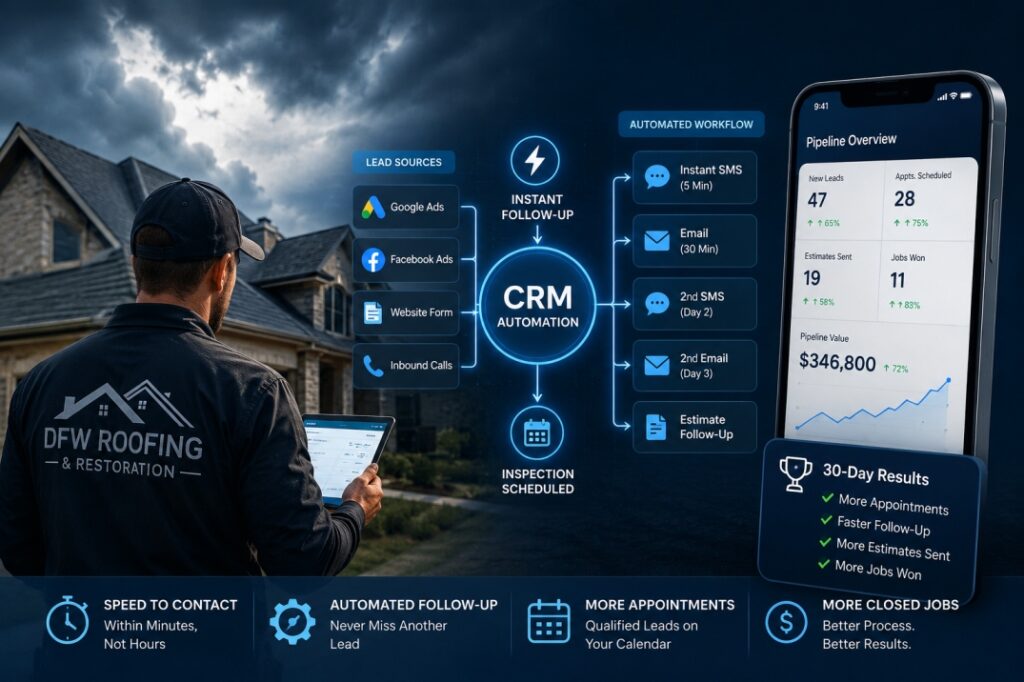
The average roofing lead in North Texas has a short window. After a hailstorm, a homeowner calls three companies. Whoever shows up first, follows up fastest, and sends an estimate within 24 hours typically wins the job. The company that calls back two days later, or sends a follow-up email a week after that, rarely makes it to the inspection. Most roofing companies in the DFW market are not losing jobs because of pricing or workmanship. They are losing jobs because their CRM and follow-up process is manual, inconsistent, and built for a slower-moving sales cycle than the storm-season reality demands. This article covers how CRM automation for roofing companies addresses this directly, specifically what was implemented for a North Texas roofing contractor, what the 30-day results looked like, and how the sales pipeline automation system was structured from lead capture through estimate delivery. The Roofing Sales Problem That CRM Automation Solves Roofing is a volume-sensitive, timing-sensitive business. During active weather seasons in North Texas, a midsize contractor can receive 30 to 50 inbound leads in a 72-hour window following a significant storm. No sales team manages that manually with consistency. What actually happens: the first 10 leads get called back the same day. The next 15 get called back the following morning. The final 10 get reached on day three, at which point half of them have already signed with another company. The estimator’s calendar fills up before the follow-up is complete, and the jobs that slipped through the cracks are invisible because nothing was tracking them. The National Roofing Contractors Association has consistently documented that roofing contractors face one of the most compressed sales cycles in the residential trades. Speed-to-contact is the primary differentiator in insurance claim work, not relationship history. Roofing CRM automation does not replace your sales team. It makes the system underneath them function at the speed and consistency the market requires — automatically capturing leads from every source, triggering immediate follow-up, scheduling estimates, and moving opportunities through the pipeline without anyone manually deciding what happens next. Why Roofing Sales Processes Break Down Without Automation Manual CRM management in a roofing company typically means one of two things: a spreadsheet that the owner updates when they remember, or a CRM that was implemented once and never fully adopted. Either way, the outcome is the same. Leads fall through. Follow-up sequences are inconsistent. No one knows which estimates are outstanding without asking someone directly. The structural problem is that roofing sales involves multiple handoffs: lead capture to initial contact, initial contact to inspection scheduling, inspection to estimate delivery, estimate to signed contract, signed contract to material order, and crew scheduling. Each handoff is a point where something can stall, and in most roofing companies, each handoff is entirely manual. Research from Salesforce’s State of Sales report found that sales reps at high-performing companies spend nearly 70% of their time selling. In contrast, underperforming teams spend the majority of their time on administrative tasks. In roofing, the administrative overhead — updating statuses, sending follow-up emails, tracking outstanding estimates — competes directly with time in the field running inspections and closing jobs. Roofing workflow automation eliminates the administrative overhead by handling it automatically. The sales team focuses on inspections, relationships, and closings. The system handles the rest. What CRM Automation for a North Texas Roofing Contractor Actually Looked Like A residential roofing and restoration company in the DFW metro engaged Mental Forge for a CRM automation build designed around the challenges described above. The company was running 8 to 12 active estimates at any given time, missing follow-ups on roughly 30% of outstanding leads, and spending three to four hours per day on administrative pipeline management across the sales team. Phase 1: Lead Capture Unification The first step was connecting every lead source — paid social ads, Google Local Services Ads, organic website form submissions, and inbound calls — into a single CRM pipeline. Previously, leads from different sources landed in different places: some in a spreadsheet, some in email inboxes, some never captured at all. The unified lead capture system pulled every inbound inquiry into one CRM view with automatic source tagging. The sales team saw all leads in one place for the first time, with zero manual entry required. Every lead that entered the system triggered the next step automatically. Phase 2: Automated Follow-Up Sequences The second component was a multi-touch follow-up sequence that launched the moment a lead was captured. The sequence ran as follows: an SMS within five minutes of lead submission acknowledging receipt and providing an estimated callback window. An email within 30 minutes with company information and a direct link to schedule an inspection. A second SMS on day two if no response. A second email on day three with a specific offer tied to current storm damage documentation requirements. This sequence ran automatically. The sales team received a notification if a lead responded or clicked, allowing them to pick up the conversation at the right moment. Leads that did not respond within seven days were tagged for a re-engagement sequence rather than disappearing into the pipeline with no status. Phase 3: Estimate Follow-Up Automation Estimate follow-up was the highest-priority automation for this company. Outstanding estimates that had not received a response within 48 hours triggered a personalized follow-up message referencing the specific address and job type. A second follow-up ran at 96 hours. A third at seven days, which offered to schedule a follow-up call if the homeowner had questions about the estimate. This single automation recovered multiple lost jobs in the first month. Homeowners who had received estimates and simply not responded, not because they were uninterested, but because life intervened, replied to the automated follow-up and moved forward. These were jobs the company would have written off under the previous system. Phase 4: Pipeline Visibility and Reporting The final component was a daily pipeline summary delivered to the business owner each morning: number of active leads, outstanding estimates