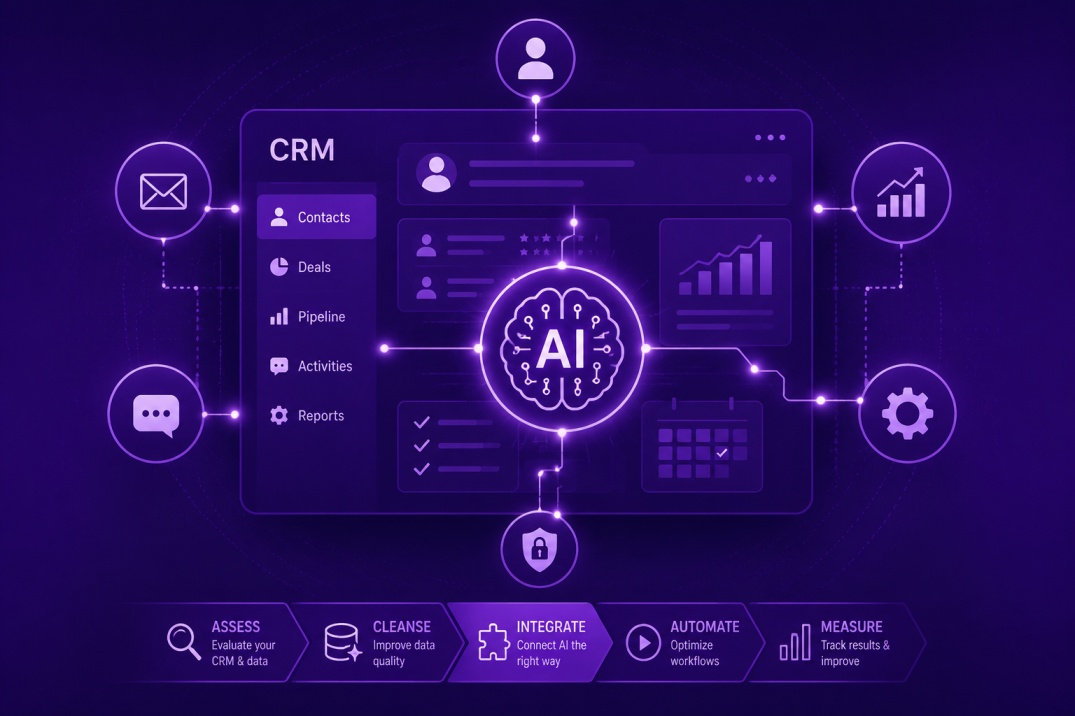
Your CRM is the operational center of your business. It holds your client history, tracks your pipeline, and is the system your sales and service teams rely on every day. When businesses decide to bring AI into that environment, the fear is understandable: what if something breaks, data gets corrupted, or the team stops trusting the system they depend on?
Those concerns are legitimate. CRM integrations done poorly create exactly those problems. Done well, AI inside your CRM removes the low-value work that slows your team down, improves data quality rather than degrading it, and gives your operation visibility it did not have before.
This guide covers what that process actually looks like: where to start, what to avoid, how to measure whether it is working, and the specific risks to manage at each stage.
Why CRM AI Integration Fails: The Most Common Problems
Before getting into implementation, it is worth understanding why these projects go sideways. The failure modes are consistent enough that they are worth naming explicitly.
The first is treating AI as a data entry replacement before the data quality problem is solved. AI systems learn from the data they are connected to. If your CRM has duplicate records, inconsistent field usage, or outdated contact information, those problems do not disappear when you layer AI on top of them. They get automated. You end up with fast, confident bad outputs instead of slow, manual bad inputs. The underlying mess has to be addressed first.
The second common failure is connecting too many tools at once. Businesses see the potential and try to integrate AI into their email system, their CRM, their scheduling tool, and their reporting platform simultaneously. The technical complexity multiplies, troubleshooting becomes difficult, and when something breaks, no one knows where to look.
The third is skipping team involvement. The people who use the CRM daily know things about the actual workflow that no audit will surface. If they are not involved in the integration design, the system will be built around assumptions that do not match operational reality. Adoption fails not because the technology does not work, but because it does not fit how the team actually works. This is one of the reasons that AI integration consulting structured around discovery before implementation tends to produce better outcomes than vendor-led deployments.
Assess Your CRM Before You Touch the AI Configuration
The first practical step is an honest assessment of your current CRM state. This does not need to be a formal project. It is a set of direct questions about how the system is being used.
Are records being updated consistently, or is data entry happening sporadically? Are your pipeline stages defined precisely enough that an AI system could interpret them correctly? Do you have a clear owner for the CRM, or is maintenance spread informally across the team? How many contacts in your database have been inactive for more than 18 months without being tagged or archived?
If the answers to those questions reveal significant gaps, those need to be addressed before integration begins. A workflow audit at this stage often surfaces data quality issues that the team knew about but had not prioritized. Getting ahead of them before an AI build begins saves significant time downstream.
Where AI Adds Real Value Inside a CRM
Once the CRM is in a state where automation makes sense, the next question is where to start. The highest-value areas are consistent across most small and mid-size businesses.
Lead Scoring and Prioritization
Most CRMs allow for manual lead scoring, but few teams maintain it consistently. AI-assisted scoring evaluates behavioral signals: email opens, link clicks, response times, form completions, and page visits, and adjusts contact scores automatically. Your sales team wakes up to a prioritized list rather than a flat pipeline that they have to evaluate manually each morning. For North Texas service businesses, where follow-up speed is directly tied to close rates, this is one of the highest-ROI applications available. It is also a core component of what we build in AI automation workflows for service businesses.
Automated Follow-Up Sequences
After-hours and weekend lead loss is a significant problem for businesses that rely on inbound inquiries. A prospect who fills out a form at 9 PM on a Friday and does not hear back until Monday morning has a high probability of having already contacted a competitor. AI-driven follow-up sequences in your CRM can send a personalized initial response immediately, schedule a follow-up at a defined interval, and flag the contact for human outreach when the sequence reaches a point that requires judgment.
This is not about removing human contact from the sales process. It is about ensuring that no inquiry goes unacknowledged while your team is unavailable.
Data Enrichment and Record Maintenance
AI tools can monitor CRM records and flag inconsistencies, merge duplicate entries, suggest contact information updates based on email signatures, and tag contacts based on activity patterns. The practical effect is a CRM that stays cleaner over time rather than accumulating the kind of data entropy that typically requires a manual cleaning project every 12 to 18 months.
Pipeline Reporting and Forecasting
AI-generated pipeline summaries pull from CRM data to produce reports that surface what a sales leader actually needs: which deals have gone quiet, which contacts are showing increased engagement, and what the pipeline looks like in 30, 60, and 90 days based on current activity patterns. Salesforce has published detailed research on how AI-assisted forecasting improves pipeline accuracy for SMB sales teams, and the underlying mechanics apply regardless of which CRM platform you are running.
Platform Considerations: What Works and What to Watch
Platform choice depends on what your business already uses and what your team is willing to maintain. There is no universally correct answer, but there are useful distinctions.
GoHighLevel is built specifically for service businesses and marketing-intensive operations. Its native AI capabilities around follow-up automation and pipeline management are strong, and the platform is designed for businesses that want to manage their entire client lifecycle in one place. It is a platform we work with regularly in AI automation builds for North Texas businesses.
HubSpot's AI features have expanded significantly and are accessible without deep technical configuration. For businesses with established HubSpot workflows, adding AI-assisted sequences and lead scoring is relatively low-disruption. The trade-off is that HubSpot's more advanced AI capabilities are typically gated behind higher subscription tiers.
For businesses that want to connect CRM workflows to external AI systems, tools like Make.com and n8n provide the middleware layer that allows data to move between platforms without custom code. These are particularly useful when the AI capability you want does not exist natively inside your CRM. A detailed comparison of these platforms and how they fit different operational profiles is available in our AI strategy resources.
Managing the Integration Without Disrupting Operations
The integration itself carries risk if it is not handled carefully. A few principles that reduce that risk in practice.
Run the new system in parallel before switching over. If you are replacing a manual follow-up process with an automated one, keep the manual process running alongside the new system for the first two weeks. Compare outputs. Identify where the automated system would have made a different decision than your team would have made manually. Adjust accordingly before the parallel process is retired.
Set clear boundaries for what the AI can do without human review. Early in an integration, err toward more human touchpoints rather than fewer. As trust in the system develops, you can gradually extend automation depth. Starting with full autonomy and pulling back when problems emerge is significantly more disruptive than starting conservative and expanding.
Train the team before go-live, not after. The people using the CRM need to understand what the AI is doing, why it is doing it, and what to do when they think it has made the wrong call. That is not a long training. It is a 30-minute session with clear documentation. The AI workshops cover this kind of practical AI literacy for business teams across the DFW metro.
Establish a review cadence. At the end of the first week and at the end of the first month, review what the system produced and compare it against expectations. This is not a set-it-and-forget-it technology. The early review cycles are where you find the edge cases and calibration issues that did not surface during testing.
Security and Data Handling: What You Need to Know
Any AI system connected to your CRM has access to customer data. That requires deliberate handling, particularly if your business operates in healthcare, legal services, or financial advisory where regulatory requirements apply.
Before connecting an AI tool to your CRM, understand what data it accesses, where that data is processed, and how long it is retained by the vendor. Review the vendor's data processing agreement and confirm it aligns with any obligations you have to your clients. For healthcare-adjacent businesses, HIPAA applicability needs to be assessed before any integration is configured.
OWASP's guidelines on AI security provide a practical reference for organizations evaluating the risk profile of AI integrations without dedicated security teams. The relevant considerations for CRM integrations center on access controls, data minimization, and audit logging.
The AI integration consulting process at Mental Forge includes a security and data handling review as a standard phase. If the AI tool or platform being integrated cannot answer basic questions about data handling and access controls, that is a meaningful signal before the build begins.
What ROI Looks Like at 30 Days and 90 Days
Realistic expectations matter. An AI CRM integration does not produce a step-change in revenue immediately. What it produces in the first 30 days is operational evidence: follow-up sequences running without manual intervention, lead scores updating automatically, and CRM records staying cleaner than they were before.
At 30 days, the measurement should focus on process adherence. Are the automated sequences triggering as designed? Are leads being scored and prioritized correctly? Is the team using the CRM in a way that feeds the AI system with the data it needs?
At 90 days, you can begin to measure outcome metrics: response time from lead submission to first contact, pipeline velocity compared to the same period in the prior year, and the percentage of contacts that are advancing through the pipeline versus stalling at the same stage.
Businesses that document these baselines before the integration begins have a clear picture of what the investment produced. Those who skip the baseline measurement end up with a system that feels valuable but cannot be evaluated objectively. If you are planning a CRM AI integration and want a structured framework for measuring it, our AI CRM Integration covers the measurement framework in detail alongside platform selection guidance.
Getting Started: A Practical Sequence
For businesses that want to move forward without overcomplicating the starting point, a practical sequence looks like this.
Spend two weeks auditing your current CRM state. Document what is in good shape and what needs to be addressed. Identify the two or three workflows that would benefit most from automation. Prioritize based on frequency and impact, not complexity.
Choose one workflow to integrate first. Set up the system, run it in parallel for two weeks, and review the outputs before turning off the manual process. Expand from there once you have confidence in the first integration.
If you want support in structuring the assessment and integration plan, the AI integration consulting team at Mental Forgeworks specifically with North Texas businesses on exactly this kind of structured rollout. Engagements are designed to produce working systems within 30 days, with documentation that your team can maintain independently.