

Choosing a first AI workflow means answering three questions: is the task suitable, can the team test it safely, and will the change reduce overall work? Successful AI automation in healthcare starts with one recurring admin task, uses invented records first, then moves to a limited live test that measures the whole process, including corrections and follow-up.
This guide walks through that process: how to choose a workflow, what to check before any patient data is involved, a worked intake example and the numbers to track. If you’re still deciding where AI fits at all, start with our overview of AI automation use cases for Texas healthcare practices.
Why AI Automation in Healthcare Starts With One Workflow
Interest in reducing admin work is high. In the American Medical Association’s March 2026 physician AI survey, 73% of the 1,262 respondents to a question about wellbeing and burnout chose reducing administrative workload through automation.
That figure measures what physicians hope for, not what any tool delivers. A rushed first project can add review work instead of removing it. Mental Forge’s AI automation services start from that question: which routine work is worth connecting across your existing systems. Picking a task you can measure gives your team a fair test and a clear answer.
Step 1: Decide Whether the Task Needs AI at All
Many admin steps are predictable and already handled by scheduling or practice-management software. AI earns its place when staff have to read varied wording or documents and turn them into something structured.
|
Task |
Ordinary Automation |
Where AI Can Help |
|---|---|---|
|
Appointment reminder |
Send an approved message at a set time |
Interpret a reply and prepare a follow-up task |
|
Intake form |
Check whether required fields contain information |
Extract fields from an approved document for review |
|
Daily report |
Calculate totals from recorded activity |
Draft a summary using those verified totals |
Check whether existing software or fixed rules can handle the task before adding AI. Compare implementation costs, maintenance, and how easily staff can inspect the result. Our guide to AI automation vs automation vs RPA covers that choice in more detail.
Step 2: Compare Your Candidate Workflows
Shortlist two or three tasks that slow your team down, such as rescheduling requests, intake checks or referral paperwork. Then compare them against the same criteria before you look at any product.
|
Decision Factor |
What to Establish |
|---|---|
|
Existing software |
Can current scheduling or practice-management features already do this? |
|
AI contribution |
Does varied language or document structure need interpretation, or would fixed rules be enough? |
|
Data and access |
Which information and permissions does it need? Can the first test run on synthetic records? |
|
System changes |
Will the tool prepare a draft, create an internal task or write to a live record? |
|
Review effort |
Who checks the output, and how long do normal and unusual cases take? |
|
Practical value |
Is the task frequent enough, and its outcome clear enough, to justify setup and ongoing costs? |
High volume alone doesn’t make a good pilot if the task needs difficult integrations or heavy review. A practice with solid electronic intake checks, for example, may gain little from another form tool. If staff spend hours sorting varied referral attachments, that may be the better candidate. Treat your choice as a hypothesis to test. For a closer look at one scheduling workflow, see our article on AI receptionists for dental practices.
For a first pilot, favor tasks where the tool prepares a draft or an internal task rather than writing straight to a live record. Keep anything involving symptoms, medication, test results or clinical priority out of scope. Those decisions stay with qualified professionals.
Step 3: Check What the Tool Can Read and Store
Patient data is where AI automation in healthcare needs the most care. Before a vendor sees any real data, work out what information the workflow needs, why it needs it and which other providers will handle it.
Protected health information (PHI) is identifiable health information covered by the HIPAA Privacy Rule. HHS cloud guidance explains when service providers take on business-associate obligations. A business associate agreement (BAA) matters, but signing one doesn’t make the whole workflow compliant on its own. HHS describes risk analysis as the first step in Security Rule compliance, so you still need one.
Ask vendors about:
permissions and who on their side can access data
how long inputs and logs are kept
whether your data is used to train models
where the data is stored
Give each task only the information it needs. HHS’s minimum necessary guidance explains the standard and its exceptions. For early demos, use invented records. Removing a name alone doesn’t count as de-identification under HHS guidance.
Texas practices have one more item for the checklist. Section 183.002 of the Texas Health and Safety Code requires covered entities to keep electronic health records physically stored in the US or a US territory, including records held by cloud providers. It also sets access limits and safeguard requirements. Make storage location part of vendor review rather than assuming federal rules cover everything.
Step 4: Assign Owners for Exceptions
A review step needs more than a notification. Name the person or team who receives uncertain patient matches, conflicting details, clinical questions and failed submissions, and agree how they acknowledge and close each task.
The ONC SAFER Guides offer safety practices for patient identification, communication and downtime. Apply them when testing connections. If a message never reaches the receiving system, someone needs to know and have a fallback.
Keep original documents so a summary never becomes the only record, and give patients an easy way to reach a person.
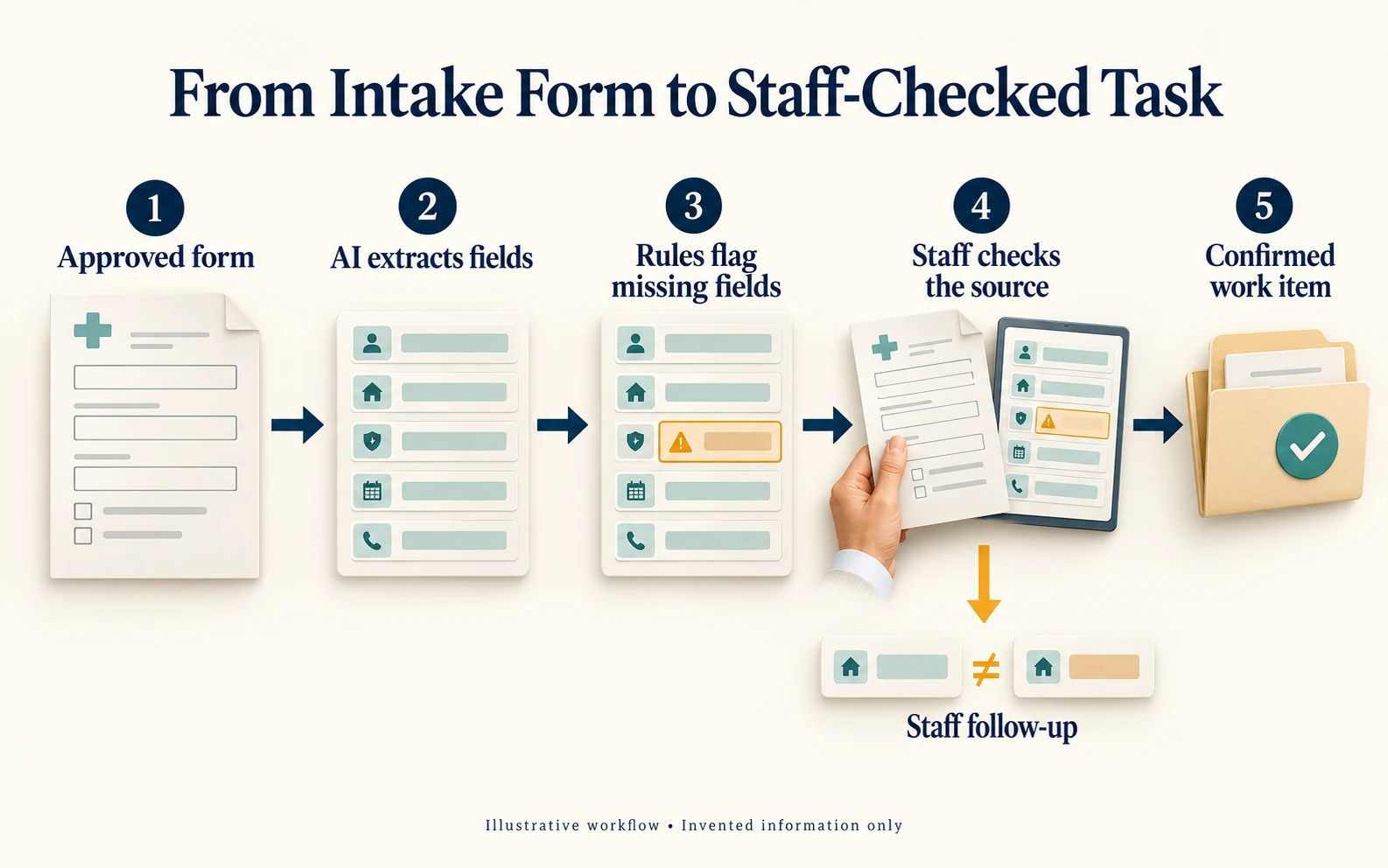
Step 5: Test the Workflow With Synthetic Records
Here is how a first intake pilot might run. The document is a fictional test form marked TEST PATIENT A. Its callback-number field is blank, and the referral attachment mentioned in its notes is missing. This is synthetic data for a demonstration, not a patient record or a client result.
|
Stage |
Expected Output |
Staff Responsibility |
|---|---|---|
|
Read the document |
AI extracts the supplied admin fields and leaves the blank number empty. |
Compare extracted values with the original form. |
|
Check completeness |
Rules flag the missing number and attachment; neither is filled in from another record. |
Confirm both are required for this task. |
|
Prepare follow-up |
Create an internal task listing the two missing items, linked to the source. |
Confirm the correct record and assign the task. |
|
Close the task |
Mark complete only after the missing items are obtained and verified. |
Approve any record update; keep unresolved items visible. |
No reminder goes to an unverified contact, and no live record changes during the test.
Then test failure paths. A second form with conflicting identifiers should land in the review queue, not attach itself to a likely match. Add unreadable fields, missing attachments and a simulated connection failure.
Before you start, agree who can pause the workflow and how staff carry on when it’s unavailable. Your privacy and technical leads should sign off before any move to live data.
Synthetic testing tells you whether extraction, routing, exception handling and failure recovery work. It can’t tell you whether the workflow saves time, because invented forms don’t reflect your real volume, document quality or interruptions. That answer comes from the next stage.
Step 6: Run a Limited Live Pilot and Measure the Whole Process
Once your privacy and technical leads approve, run the pilot on a small, defined slice of real work, such as one location or one form type, for a set period. Staff keep their normal fallback, and every output is still reviewed.
Set your measures before the live pilot begins and record them for the current process first. For the intake example, track:
forms processed
total staff handling time, including exceptions
extraction corrections
incomplete cases
missed follow-ups
A fast extraction followed by lots of correction may be worse than your current process.
Agree task-specific acceptance criteria for accuracy, completion and staff effort. When you judge value, count setup, integration, maintenance and review time, not just the speed of the first draft. Our breakdown of what AI automation costs a small business lists the cost lines to include.
Step 7: Decide Whether to Expand
Expand AI automation in healthcare settings only when the live pilot meets the criteria you agreed and someone owns its upkeep. A shorter queue is useful only if requests still reach the right people and the work gets done.
If it works, apply the same method to the next candidate on your shortlist. If it doesn’t, the limited scope and staff review keep the cost of finding out contained, and the measures show where it fell short. For a wider rollout plan, see our step-by-step roadmap for implementing AI in a small business.
Mental Forge’s AI integration services cover workflow discovery, implementation and training. A useful first conversation covers which systems need to connect, who checks outputs and who maintains the process after handover. If your team needs hands-on practice first, Fusion Foundations workshops cover practical AI skills for staff.
Bring One Workflow to the Conversation
The best first project for AI automation in healthcare is usually the task that slows your team down most often. Write down the steps, the tools involved and where staff need to review the result.
Discuss your workflow with Mental Forge to see whether it’s a good first pilot for your practice and what your team would need to run it. Please describe the process without including identifiable patient information in the contact form.