
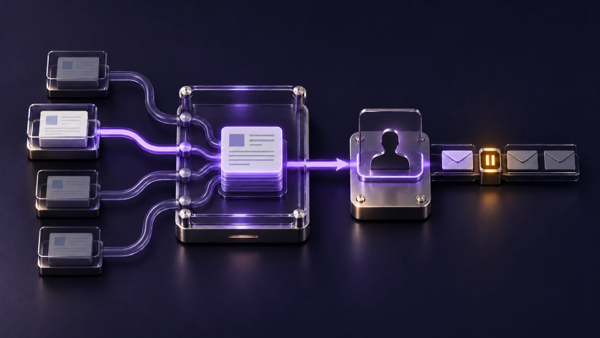
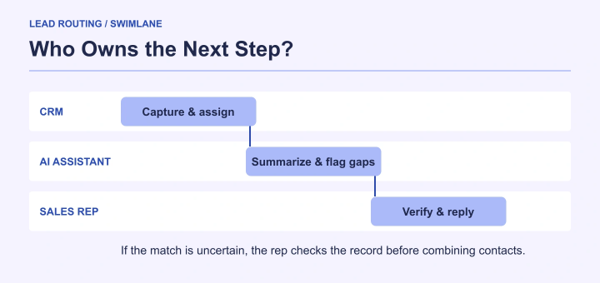
AI CRM automation is useful when inquiries reach your sales team but nobody is sure who should respond. Have your customer relationship management system, or CRM, assign each lead to a rep and set a deadline for the next step. AI can summarize what the buyer asked for and draft a reply. The rep checks both against the original message.
This guide follows one lead from first inquiry to sales call. If you're still deciding how to connect AI to your CRM, start with our guide to integrating AI into an existing CRM.
Give Every New Lead One Record and One Owner
Record where the inquiry came from, who sent it, what they asked for, and when it arrived. If it's from an existing customer, attach the new request to their account without replacing earlier notes. When two contacts share an email address or phone number, send the match to a rep for review.
Assign inquiries by territory or by who already manages the account. Send anything the rules can't place to an inbox that a named rep checks, with someone else covering when that rep is away.
Give priority to clear buying signals, such as a request for a call or a deadline for a decision. If AI flags one, show the rep the sentence it came from. A mention of "next Friday" could refer to a meeting, a deadline, or a day the buyer is unavailable.
Split the Work Between Rules, AI, and Reps
Most of a good AI CRM automation setup is plain automation. Assignment, deadlines, and stop rules follow fixed logic, so they should not depend on AI. AI earns its place where the input is messy text, such as a long inquiry or a reply that asks three things at once. Our guide to AI automation vs. automation vs. RPA explains the difference.
| Task | Best Handled By | Why |
| Assign an owner and due time | CRM rules | The criteria are fixed and should be auditable. |
| Summarize a long inquiry | AI, checked by the rep | The text varies, and a summary can miss or invent details. |
| Draft a first reply | AI, approved by the rep | Wording helps, but the rep owns any promise. |
| Stop reminders after a reply | CRM rules | A missed stop sends the wrong message to a real buyer. |
| Answer price, scope, or coverage questions | The rep | These are commitments the business must stand behind. |
Build the Handoff From Inquiry to Sales Conversation
| Stage | What the CRM Does | What a Person Checks |
| New inquiry | Records the source and assigns an owner or routes to the intake queue. | Confirms uncertain matches and missing contact details. |
| Qualification | Saves the original inquiry and shows an AI summary with open questions. | Checks fit, urgency, and any details the summary inferred. |
| Follow-up | Creates a task or enrolls an eligible lead in an approved sequence. | Approves tailored messages and handles questions about price, scope, or commitments. |
| Handoff | Records the next owner, due time, and most recent conversation. | Confirms that the receiving rep has enough context to act. |
Check what your plan allows before you build. In HubSpot, the sequences tool requires Sales Hub or Service Hub Professional or Enterprise and an assigned Sales or Service seat. Enrolling a contact automatically when they submit a form runs through a workflow, which HubSpot lists as Enterprise only. On other tiers, have the form create a task for the rep, who then enrolls the lead by hand.
Follow One Lead Through the CRM
Suppose a facilities manager asks a commercial maintenance company to service three offices before its current contract expires. She gives the company's name and two addresses. The rep needs the third address to check whether the company can cover all three sites.
The CRM connects the inquiry to the account and creates a task for the territory rep. AI summarizes the three-site request and flags the missing third address. It drafts a short question asking for the location. The rep checks the original message, then sends the question without promising coverage or a start date.
When the buyer responds, the workflow stops the scheduled reminders and sends the reply to the rep. After confirming that all three sites are in the service area, the rep marks the inquiry ready for a sales call and hands it to the account lead. The handoff includes the deadline, the addresses, and a task to arrange the call. The account lead can open the original messages without asking the buyer to repeat the details.
Define What Stops Follow-Up
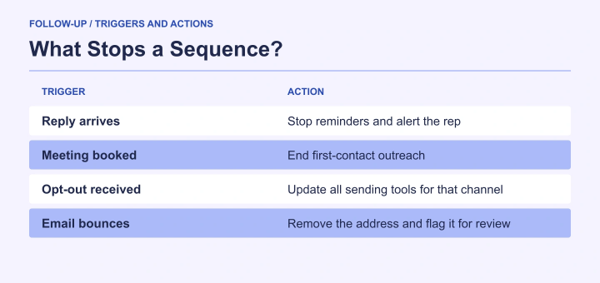
A reply should stop scheduled reminders and give the rep a task to read it. End first-contact outreach when a meeting is booked. If an email bounces, flag the address for the rep and take it out of the queue.
Many CRMs do part of this for you, but check the defaults. HubSpot unenrolls a contact from a sequence when they reply, book a meeting through a sequence email, unsubscribe, or bounce. The reply and meeting triggers can be turned off for each sequence, so confirm they are on before launch.
Make sure an opt-out reaches every tool that sends messages through the affected channel. The FTC's CAN-SPAM guide requires businesses to honor email opt-outs within 10 business days. For texts, the FCC says consumers can opt out in any reasonable manner, so a plain-language "stop texting me" counts.
Check eligibility immediately before sending a message. This matters when a reply, meeting, or ownership change arrives after a reminder was queued. Test duplicate form submissions and a reply that lands just before a send. For each case, check the CRM record, the message queue, and the assigned owner.
Keep Customer Data Out of the Wrong Tools
An AI CRM automation reads whatever buyers type, including phone numbers, addresses, and sometimes account details. Use the AI features inside your CRM or an approved tool under a business agreement. Don't paste inquiries into a personal chatbot account. Our guide to AI governance and data privacy for small businesses covers how to set those rules.
Judge the Pilot by the Quality of the Handoff
Start with one source, such as your contact form. Compare the share of inquiries assigned by the deadline and the time to a reply that answers a question or proposes a next step. Track how many reach a sales call. Then audit a sample for wrong summaries, duplicate tasks, and reminders sent after a reply.
If every lead has an owner but few reach a sales call, open a few stalled records. A rep might be waiting for details the form could have collected, or the team may need someone to cover inquiries that arrive while reps are on calls.
Client results give a sense of scale, but they mix several changes. In a North Texas roofing and pool restoration project, Mental Forge reports 15 qualified leads in 30 days after combining targeted ads, a custom CRM, and automated follow-up. In a separate roofing CRM project, Mental Forge reports lead response time falling from four to six hours to under ten minutes. Both are client-reported figures for whole projects. To judge AI CRM automation in your own pilot, track where each lead came from and what happened after it reached the rep.
If you know where leads stall, bring one anonymized record to a CRM workflow discussion with Mental Forge. Include who received it, what the next step should have been, and which messages went out. If after-hours inquiries are the main gap, see our guide to AI lead follow-up automation.