What Is AI Integration? A Plain‑English Guide for Business Owners
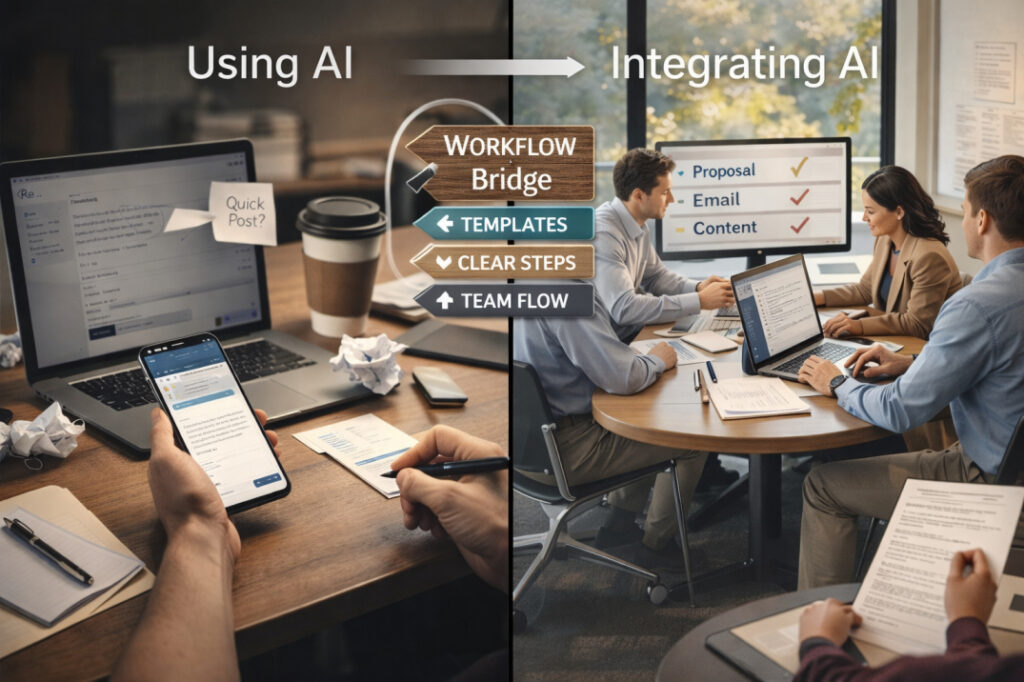
If you run a small or mid‑sized business, you’ve probably already “tried” AI. You’ve pasted a sentence into a chat box, asked for a quick email, or watched someone on LinkedIn post about how AI “changed everything.” Then you went back to work and nothing felt different. That gap between “playing with AI” and actually using it in your business every day is exactly what AI integration is all about. It’s not about fancy technology. It’s about making AI a simple, normal part of your team’s routine, like using a shared calendar or a template library. In this guide, you’ll learn: The Difference Between Using AI and Integrating AI Using AI casually is like testing a new kitchen gadget once in a while. You might ask an AI tool to write a social post on a Tuesday, or check a draft email once per week. It feels helpful, but it does not change how your team actually works. AI integration is different. It means: Practical contrast The difference matters because using AI can save time randomly. Integrating AI can make your business faster, more consistent, and less dependent on heroic effort from a few people. What AI Integration Looks Like in Practice 1. Email workflow example Imagine your support team answers 100 customer emails per day. In this case, AI is integrated into your email workflow because: This is what is AI integration for business in one concrete example: a repeatable, trusted pattern that makes everyone quicker and more consistent. 2. Proposal workflow example Imagine you write custom proposals for clients. Here, AI integration means: 3. Content workflow example Imagine you run a small service‑based business and post content regularly. Integration shows up when: The 3 Layers of AI Integration You can think of AI integration in three practical layers: tool access, workflow embedding, and team fluency. 1. Tool access This is the simplest layer: your team has the right tools and can log in. If your team still has to hunt for “which link is the right AI thing today,” you are not yet integrated. Action step (simple) 2. Workflow embedding This is where AI stops being a “toy” and becomes part of the job. Here, AI is embedded because: Action step (practical) 3. Team fluency This is the hardest but most important layer: your team knows how to use AI well, not just that it exists. Without this layer, AI becomes inconsistent: some people love it, some avoid it, and results vary wildly. Action step (foundation‑level) This is exactly what a Fusion Foundation‑style workshop supports: clarity, not complexity. What AI Integration Is NOT AI integration is a simple idea, but it is often misunderstood. Let’s clear up a few myths. AI integration is also not about “doing everything with AI.” It is about choosing the right tasks where AI adds real value: first drafts, summaries, simple replies, and routine research. Readiness Check: Are You Ready to Integrate AI? Before you dive into AI integration, ask yourself these five practical questions. If you answered “yes” to at least 3–4 of these questions, you are ready to start integrating AI into your business. Your First Step: Start Small, Build Confidence The best way to begin AI integration is not to overhaul everything at once. Start with one small, high‑impact workflow. Recommended path Pick one workflow Email, client proposals, or content creation.Choose the one that eats the most time or feels the most inconsistent. Define a simple rule For example: “Every email starts with an AI first draft, then a human edit.”Or: “Every blog post begins with an AI outline and draft.” Document the 4–5‑step process 1: Gather inputs (e.g., customer question, brief notes).2: Feed them into AI.3: Get a first draft.4: Edit for clarity and brand voice.5: Use or send. Test for one week Track how much time you save.Note where you still need human judgment or extra polish. Refine and repeat Fix the steps that feel clunky.Once this workflow feels natural, repeat the process for a second workflow. This is how many small and mid‑sized businesses start using AI integration in a practical, low‑stress way. If you want help choosing the right tools and designing a simple workflow that fits your team, AI integration consulting can guide you step by step. A short discovery call helps you map your current processes and design a custom plan that fits your budget and goals. Free Practical Help If you are unsure where to start or you want a simple checklist tailored to your business, consider a Fusion Foundation‑style workshop. These sessions help everyday professionals: The goal is to use AI in a way that feels natural, not forced, and that actually saves time in daily operations. Let’s Build Your AI Foundation If you are a business owner, founder, or leader in a small or mid‑sized team, you already have enough to do. You do not need another confusing tech project. What you need is a simple, practical AI integration plan that fits your existing workflows, your team, and your budget. If you are ready to: Then the next step is a free discovery call. You can review your current processes, share your goals, and walk away with a clear path to your first AI integration move. Click here to book a call and start building your AI foundation the simple way.
AI Automation vs Automation vs RPA: A Clear Decision Guide
There’s a moment most operations leaders have experienced: you’re sitting in a vendor demo, the presenter uses three different terms in the same sentence, “automation,” “RPA,” and “AI automation”, and nobody in the room stops to ask what the difference actually is. Everyone assumes someone else already knows. The result is expensive. Teams buy RPA for problems that need AI. They deploy AI for tasks that a basic script would handle better. They call everything “automation” in strategy documents and discover, six months into implementation, that the tool they selected was built for an entirely different class of problem. This guide draws a clean line between all three, not through technical definitions, but through the lens that actually matters in practice: what kind of task are you dealing with, and what kind of system is designed to handle it? Why Teams Mix Up These Terms The confusion isn’t random. It’s the product of marketing language bleeding into operations vocabulary. When major software vendors started rebranding legacy workflow tools as “intelligent automation” and “AI-powered RPA,” the distinctions between categories started to blur in real conversations. The word “automation” became a catch-all. “AI” became a modifier applied to nearly everything. “RPA” got folded into broader platform narratives until it lost specific meaning for anyone outside the technical implementation team. This matters beyond semantics. Each of these approaches — traditional automation, RPA, and AI automation — was designed to solve a specific category of problem. The structure of the task determines the right tool. When the vocabulary is blurry, so is the decision-making. There’s also a credibility problem. Teams that talk about “AI automation” without being able to articulate what distinguishes it from basic scripting lose trust with both technical teams (who see through vague claims) and executives (who get burned when reality doesn’t match the pitch deck). Getting the language precise is the first act of getting the implementation right. Traditional Automation (Rules, Triggers, Scripts) Explained Traditional automation is deterministic. It follows instructions exactly as written, every time, with no variation. Give it a structured input that matches its rules, and it performs reliably. Give it anything else, and it fails or does nothing. The classic examples are everywhere: an email notification that fires when a form is submitted, a script that pulls data from a spreadsheet and formats it for a report, a scheduled task that archives old files at midnight on Sundays. These automations do exactly one thing — the thing they were told to do. Where it excels: High-volume, perfectly structured, stable workflows. If the inputs don’t change and the rules don’t change, traditional automation is your most reliable and lowest-maintenance option. It doesn’t drift, it doesn’t hallucinate, and it doesn’t require monitoring beyond basic error logging. Where it breaks: The moment inputs become variable. A form with an optional field that sometimes arrives blank. A file that uses inconsistent date formats. A naming convention that changed when the team changed. Traditional automation handles none of this gracefully — it either fails hard or, worse, silently processes incorrect data. The core design principle: Traditional automation is a covenant with consistency. If you can guarantee that your process will look the same today as it does two years from now, it’s the right choice. If your process involves human behavior, natural language, or any meaningful variability, it isn’t. RPA Explained and Where It Fits Robotic Process Automation occupies a specific and often misunderstood niche. It doesn’t replace traditional automation, it solves a problem that traditional automation can’t touch: how do you automate a process when the systems involved have no API, no structured data export, and no way to connect programmatically? The answer RPA gives is: you teach software to use the interface the same way a human does. Bots navigate screens, click buttons, copy values from one field and paste them into another, log into portals and extract what they find. They’re mimics, extraordinarily fast, tireless mimics that don’t require system integration because they operate at the surface layer, exactly as a human employee would. Where it genuinely shines: Legacy system integration is the classic use case. A healthcare organization running a 15-year-old patient management system that was never built for API access. A financial firm using proprietary software with no export function. A mid-sized manufacturer whose ERP vendor charges for integration capabilities they can’t afford. RPA handles these scenarios without requiring the underlying systems to change. The honest limitation: RPA bots are fragile in a very specific way. They’re mapped to a visual interface. When that interface changes — a button moves, a field gets relabeled, a new version of the software ships with a different layout — the bot breaks. Maintaining an RPA estate at scale means ongoing bot maintenance that can consume a meaningful portion of the operational savings you were trying to capture. The critical distinction from AI: RPA is mimicry, not intelligence. A bot can navigate a UI and copy a value. It cannot read an unstructured paragraph and extract a key piece of information from it. It cannot route an inquiry based on the sentiment behind the language. The moment a task requires interpretation rather than navigation, RPA reaches its ceiling. What AI Adds to Automation Systems This is where the conversation shifts from mechanics to capability. AI doesn’t automate tasks by following instructions. It automates tasks by recognizing patterns, interpreting meaning, and generating responses calibrated to context. The underlying architecture — language models, classification systems, predictive engines — learns from data rather than executing from rules. What this unlocks in practice: Handling unstructured inputs. The majority of business data is unstructured — emails, documents, meeting notes, customer messages, scanned forms. Traditional automation and RPA require structured inputs to function. AI processes unstructured content natively. It reads a supplier email and extracts the relevant order details. It scans a contract and surfaces clauses that deviate from standard language. It classifies a support message by urgency and intent, not just keyword matches. Adapting
How to Stop AI Training on Your Google Docs

Google says it is not directly using your private documents to train its main AI models, but your files can still power certain AI features and may be exposed if they are shared publicly or accessed through tools like Gemini. By tightening your privacy settings, adjusting how you share documents, and refining a few everyday habits, you can greatly limit how much of your work ends up supporting AI systems and keep stronger control over your information. What AI Training Really Means? When people talk about Google Docs training AI, they usually blend together several different practices that need to be separated to understand the real risk. In broad terms, your documents can be involved with AI in at least three ways. First, they can be scanned to power built-in smart” features such as spell checks, suggestions, and document search. Second, they can be used by generative tools like Gemini or “Help me write”, which read your content on demand and may use your prompts or snippets to improve models. Third, if a document is publicly indexable, its content can be swept into massive web datasets used to train AI models, just like any other web page. This is where many teams start thinking seriously about whether their current AI integration is compatible with their confidentiality needs. Sensitive client briefs, internal strategies, and personal information look very different once you imagine them sitting inside future datasets. What Google Says About Docs and AI? Google’s public messaging emphasizes that private Google Docs are not directly used to train general-purpose AI models, and that data is processed primarily to deliver services like search, spam detection, and document safety features. At the same time, its privacy policy keeps the door open by allowing the use of publicly available information to improve models and by integrating Gemini tightly with services like Docs, Gmail, and Drive. There is an important nuance here. Even if the company says your private files are not training its core models, AI assistants that can access your workspace, such as Gemini for Workspace or Gemini Deep Research, may still learn from the prompts, snippets, and context you feed them, especially if you enable feedback or improvement options. And if a document (or a link to it) is posted in a way that makes it publicly discoverable, it can be treated like any other web content for large-scale AI training. For anyone designing AI workshops or policies inside an organization, this ambiguity is part of what makes Docs a risk: assurances today can change with a quiet terms-of-service update tomorrow. Practical Steps Inside Google Docs and Google Account If your goal is to stop Google Docs from feeding into AI as much as possible, you are really working on three layers: smart features, generative assistants, and account-level data use. Turn off Docs smart features: In an open document, go to Tools → Preferences and disable smart suggestions such as Smart Compose or similar AI-powered options where available. This limits how much live document content is routed through predictive systems. Disable cross-product smart features: Open Gmail on desktop, go to Settings → See all settings, and scroll to the Smart features and personalization section, where you can switch off smart features in Gmail, Chat, Meet, and other Google products. Because Google links these settings across Workspace, turning them off can remove or reduce generative options like “Help me write” in Docs as well. Reduce account-level data use: In your Google Account under Data & privacy, turn off options like Web & App Activity, certain personalization settings, and smart features that allow data from Gmail and Docs to feed personalized AI behavior. These switches do not guarantee that your content never touches machine learning systems, but they do narrow the scope of how it is reused. From a content strategy perspective, reducing these features is part of a broader AI integration posture. you are choosing when AI helps you write and when privacy takes priority. Keep Your Docs Out of Public AI Datasets Even if you tighten in-app settings, your documents can still end up in AI training data if they are effectively public. That risk increases dramatically when teams default to “anyone with the link can view” or accidentally publish Docs on public sites. The most important habits here are straightforward. Always check the Share dialog and avoid “Public on the web” or similarly open settings unless you genuinely want a document indexed. When you do embed or link Docs on a website, remember that anything visible to search engines can be swept into future datasets, just as if it were a static HTML page. If you manage a site, you can also use tools like robots.txt and AI-specific crawler blocks (such as mechanisms that control Google-Extended and other AI-training crawlers) to discourage large-scale scraping of content you host. Many organizations that handle confidential material are now rewriting their sharing policies and training staff to treat Docs links like public URLs, not private attachments. The moment something is posted in a public Slack channel, forum, or blog, it becomes fair game for indexing and downstream AI training flows. When to Leave Google Docs Entirely There is an uncomfortable but honest conclusion at the bottom of all of this: if you need hard guarantees that your content will never be used to train AI, the surest answer is to stop using Google services for that content. Marketers, legal teams, and security leads are increasingly moving the most sensitive work into tools that provide end-to-end encryption and explicit contractual limits on how data can be processed. Alternative document platforms that emphasize privacy give you stronger technical boundaries: content is encrypted before it reaches the server, and providers commit not to use it for model improvement. Some privacy-focused suites pair storage with collaboration and file-sharing that mirror Docs’ convenience without the same exposure to broad AI pipelines. For companies that already run internal AI training or internal-only assistants, this shift also makes it easier