

One practical use of AI for home services businesses is sorting replies to open estimates. A warranty question goes to the estimator. A request for an earlier installation goes to the scheduler. Quotes with no reply get a timed reminder, and a person still sets every price.
This guide starts after the estimate goes out. If you lose leads before you ever quote, start with our guide to AI automation for roofing, HVAC, and plumbing.
Find Out Where Open Quotes Stall
Look back at a recent batch of sent estimates. Check when each went out, whether the homeowner replied, and who was meant to follow up. For quotes that are still open, find out what's holding them up. If a homeowner is waiting for an installation date, the office needs to check the schedule before sending another reminder.
Follow-up often depends on who remembers. In one North Texas roofing project, Mental Forge reports that estimate follow-up coverage rose from about 40% to 100%, with every estimate getting at least three touchpoints. That is a client-reported result, not an independent study, but it shows how many quotes can slip without a system.
| What You Find | Where to Start |
| Quotes sit unanswered and nobody owns the follow-up | Assign an owner and set a reminder based on the date the estimate was sent. |
| Homeowners reply, but technical questions get buried in the inbox | Have AI summarize replies and flag questions for the estimator. |
| Customers accept quotes, but jobs sit unbooked | Create a scheduling task on acceptance and give it a due date. |
| The same homeowner gets messages from two systems | Pick one tool to send quote reminders and disable the duplicate rule. |
If inquiries stall before you send an estimate, fix lead capture and first response first. Our after-hours lead follow-up guide covers that first reply.
Use Rules for Reminders and AI for Replies
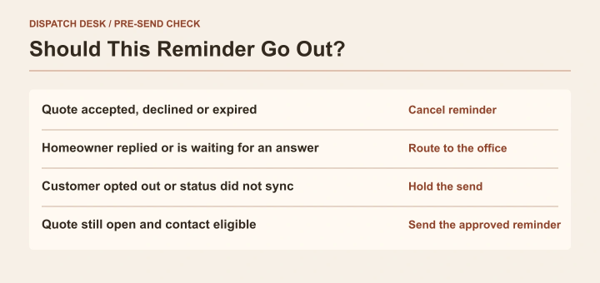
Keep one record for each estimate, with its quote number, status, and the name of the person following up. Before a scheduled reminder goes out, the system should check that the quote is still open, nobody is waiting for an answer from the office, and the customer can still receive messages on that channel.
Those checks are yes-or-no rules, so plain automation handles them well. Replies are different. When a reply covers several things at once, AI can pull out the questions and draft an acknowledgment. Keep the original message beside the summary so staff can see what the homeowner actually asked. Leave decisions about price, scope, and availability with the people who can confirm them. Our guide to AI automation vs. automation vs. RPA explains where each fits.
Jobber, for example, lets users on Connect and higher plans set up to two automatic reminders for quotes in "awaiting response" status. Reminders use the same channel as the original quote and depend on the recipient's communication settings. Check what happens when a homeowner replies in a different channel. If that reply doesn't reach the quote record, give the office a way to stop the next reminder.
When you compare AI for home services businesses, ask each vendor one question: what pauses a reminder when the customer replies by phone, text, or email?
Follow One HVAC Estimate From Reply to Booking
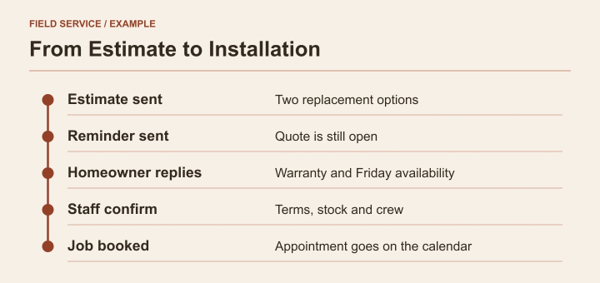
Suppose an HVAC company in North Texas sends an estimate with two replacement options. Two business days later, the quote is still open. The system sends one approved reminder inviting the homeowner to reply with questions. She asks whether the lower-priced system includes the same labor warranty and whether the company can install it before guests arrive on Friday.
The workflow pauses reminders when the reply arrives. It keeps the message on the quote record, and AI pulls out the two questions for the coordinator to check. The coordinator can then review a short acknowledgment before sending it.
Thanks for getting back to us. I'll check the labor warranty on the lower-priced option and ask our scheduling team what's available before Friday.
The estimator checks the actual warranty terms. The coordinator checks whether the equipment and a qualified crew are available before offering an installation date. If the homeowner accepts, the quote leaves the reminder queue and the coordinator confirms the appointment. If the homeowner declines, the office closes it and records the reason if the customer gave one.
The same routing works in other trades. A roofer can route a question about decking replacement to the estimator. A plumber can send a question about drywall repair to the person who priced the work.
Give the Office a Way to Stop a Message
Run test estimates through the whole sequence before sending reminders to customers. Test these cases:
- A homeowner replies just before a reminder goes out.
- A quote expires while reminders are still queued.
- The same homeowner has two open estimates.
- A customer has opted out of texts.
- The quote status fails to sync between tools.
If the system can't confirm the quote is eligible, it should send the item to the office for review.
Opt-outs need extra care. The FCC says consumers can opt out of robotexts at any time and in any reasonable manner, even after giving consent. A reply like "please stop texting me" should end text reminders, even if it doesn't match the keyword your tool expects. If your reminders also promote offers by email, the FTC's CAN-SPAM guide requires you to honor opt-outs within 10 business days.
Put the quote number, latest reply, and person responsible in the same queue. That way the coordinator can see what's waiting without reopening the inbox and the estimate separately.
Measure Booked Jobs From Quotes You Sent
The real test of AI for home services businesses is booked work, not message volume. Track how many quotes become booked jobs. If your customers usually decide within 30 days, give every quote in both groups the full 30 days before comparing booking rates. Count each estimate once, even if it lists several options. Track accepted quotes that are still waiting for a date separately.
| Measure | How to Count It | What It Tells You |
| Quote-to-booking rate | Booked jobs ÷ quotes sent, after the full decision window | Whether follow-up turns into work |
| Time to answer a question | Hours from homeowner reply to a staff answer | Whether replies reach the right person |
| Reminders sent in error | Reminders sent after a reply, acceptance, or opt-out | Whether stop rules work |
| Accepted but unscheduled | Accepted quotes with no booked date | Whether the handoff to scheduling works |
Compare similar jobs and lead sources where possible. A week of storm-related roof repairs and a week of planned replacements can produce very different booking patterns, even with identical follow-up.
If replies rise but bookings stay flat, look for a reason in the replies. For example, if homeowners keep asking whether disposal is included, clarify that line on the estimate before changing the reminder schedule.
If quotes keep stalling at the same step, bring a few examples with customer details removed to a workflow discussion with Mental Forge. Show which reminders go out today and what happens when someone replies. We set up this kind of AI for home services businesses as part of our AI automation services.