

Measure AI automation ROI by comparing the money one workflow saves or earns with the cost to set it up and run it. Track hours freed separately. For example, if staff use the extra time to clear a backlog and payroll stays the same, report the hours and the backlog reduction separately from cash savings.
Most businesses skip this step. In IBM's research summary on AI ROI, 79% of executives say they see productivity gains from AI, but only about 29% say they can measure ROI confidently. The method below closes that gap for one workflow. For typical build and running costs, see our AI automation cost guide.
Establish the Baseline Before You Automate
Time the task from the first step to the result staff can use. For supplier invoices, start when the invoice reaches the queue and record the minutes staff spend entering, checking, and correcting it before approval. Include invoices with missing purchase-order numbers or totals that don't match.
Compare similar work before and during the pilot. If the software only handles invoices from regular suppliers, compare those invoices in both periods and include any time spent routing exceptions. Record changes in staffing or volume too. A drop in overtime may have more than one cause.
In IBM's evaluation of an AI coding assistant, the team compared matched twelve-week windows before and after adoption, using work already recorded in its development system. It had no comparable control group, so other changes could have affected the result. Apply the same idea to invoices: use completed records and compare similar work. If you can, keep a similar batch on the manual process during the pilot.
Expect modest time savings, not dramatic ones. A St. Louis Fed survey found that workers who used generative AI saved an average of 5.4% of their work hours in November 2024. A baseline lets you see whether your workflow beats that or falls short.
Work Out What the Savings Are Worth
Use payroll or vendor invoices to confirm a drop in overtime or outside processing fees. If the team uses the extra time to deliver more paid work, count the additional revenue after direct costs and record how you linked it to the change.
Count error reductions the same way. If staff avoid a penalty or a paid correction, record the verified cost. If avoiding the mistake only saves handling time, count those minutes once. Keep quality measures such as missed duplicate invoices visible even if you don't assign them a dollar value.
Include setup and training, plus recurring costs such as subscriptions, usage fees, and maintenance. If the new process adds a paid review step, count that cost. If your reported savings already reflect the cost of review, count it only once.
Calculate AI Automation ROI and Payback
ROI (%) = (total financial benefits − total costs) ÷ total costs × 100
Choose a period, such as the first 12 months after launch. Include setup in the cost and use those same 12 months for benefits and running costs. Payback is how long it takes to earn back the upfront spend. If monthly savings after running costs are steady and positive, divide the setup cost by that amount. If the figures vary, keep a running total until it crosses zero.
Worked Example With Illustrative Figures
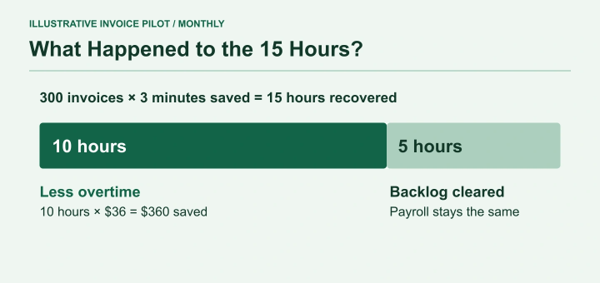
Suppose a distributor processes 300 invoices per month. Average handling time falls from eight minutes to five, including checks and corrections in both periods. That frees 15 hours a month at the same volume. For this example, assume the change cuts 10 hours of paid overtime and the office uses the other five hours to clear a backlog.
The overtime rate is $36 an hour. Under the Fair Labor Standards Act, non-exempt staff earn at least time and a half for hours over 40 in a week. The BLS median pay for bookkeeping and accounting clerks was $24.36 an hour in May 2025, and time and a half on that is about $36.
| First-Year Calculation | Amount |
| Monthly overtime savings in the example | 10 × $36 = $360 |
| Annual financial benefit if the monthly reduction holds | $4,320 |
| Upfront setup and training | $1,200 |
| Ongoing cost | $160/month × 12 = $1,920 |
| Total first-year costs | $3,120 |
| First-year net benefit | $1,200 |
| First-year ROI | 38.5% |
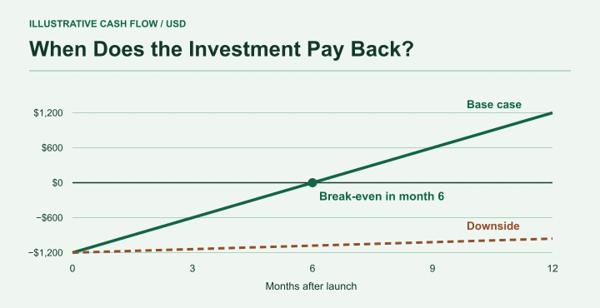
After $160 in running costs, the distributor saves $200 a month. At that rate it recovers the $1,200 setup cost in six months. If overtime falls by only five hours a month, the monthly saving after costs drops to $20, first-year ROI falls to about −31%, and simple payback stretches to five years if costs and savings hold.
Test the Setup Cost Too
The $1,200 setup assumes an off-the-shelf invoice tool configured in-house. A custom single-workflow build usually costs more. Our cost guide puts it at $1,500 to $5,000, plus $50 to $200 a month. If fixed rules can do the job without AI, the build is often simpler. Our guide to AI automation vs. automation vs. RPA helps you tell which you need.
At a $3,000 setup with the same $200 monthly saving, payback takes 15 months. First-year ROI is about −12%, because first-year costs reach $4,920 against $4,320 in savings. In year two, with no setup cost, the same workflow returns $2,400 net. That's why AI automation ROI should be judged over the period you expect to keep the workflow, not only the first year.
Avoid the Common Measurement Mistakes
| Mistake | What to Do Instead |
| Counting freed hours as cash savings | Count cash only when payroll, overtime, or fees actually drop. Report other hours separately. |
| Timing only the easy cases | Include exceptions, corrections, and review time in both periods. |
| Leaving out running costs | Add subscriptions, usage fees, and maintenance for the whole period. |
| Counting review time twice | Subtract it once, either in the savings or in the costs. |
| Comparing a busy month with a quiet one | Compare similar volume and similar work, or adjust per invoice. |
Decide Whether to Keep the Workflow
Review cash impact and quality together. In the invoice example, the office should track duplicate entries, wrong amounts, and the share of invoices that need manual correction. If overtime falls but mistakes rise, look at which invoices cause trouble. Keeping those cases with staff may preserve the useful part of the workflow.
Show the before-and-after figures, where they came from, and the assumptions that could change the result. In this example, the first year breaks even at about 7.2 overtime hours saved per month on average. If savings stay below that, review the cost or scope before expanding. Microsoft's AI Leader ROI Worksheet is built for Copilot rollouts, but its format works for recording the evidence behind any AI automation ROI estimate.
If you're still selecting a workflow, use the small-business AI implementation roadmap to choose a pilot. If you already have one in mind, bring its volume, handling time, and known costs to a workflow discussion with Mental Forge to map what you'd need to measure before investing.