
Google says it is not directly using your private documents to train its main AI models, but your files can still power certain AI features and may be exposed if they are shared publicly or accessed through tools like Gemini. By tightening your privacy settings, adjusting how you share documents, and refining a few everyday habits, you can greatly limit how much of your work ends up supporting AI systems and keep stronger control over your information.
What AI Training Really Means?
When people talk about Google Docs training AI, they usually blend together several different practices that need to be separated to understand the real risk.
In broad terms, your documents can be involved with AI in at least three ways.
First, they can be scanned to power built-in smart” features such as spell checks, suggestions, and document search. Second, they can be used by generative tools like Gemini or “Help me write”, which read your content on demand and may use your prompts or snippets to improve models. Third, if a document is publicly indexable, its content can be swept into massive web datasets used to train AI models, just like any other web page.
This is where many teams start thinking seriously about whether their current AI integration is compatible with their confidentiality needs. Sensitive client briefs, internal strategies, and personal information look very different once you imagine them sitting inside future datasets.
What Google Says About Docs and AI?
Google’s public messaging emphasizes that private Google Docs are not directly used to train general-purpose AI models, and that data is processed primarily to deliver services like search, spam detection, and document safety features. At the same time, its privacy policy keeps the door open by allowing the use of publicly available information to improve models and by integrating Gemini tightly with services like Docs, Gmail, and Drive.
There is an important nuance here.
Even if the company says your private files are not training its core models, AI assistants that can access your workspace, such as Gemini for Workspace or Gemini Deep Research, may still learn from the prompts, snippets, and context you feed them, especially if you enable feedback or improvement options. And if a document (or a link to it) is posted in a way that makes it publicly discoverable, it can be treated like any other web content for large-scale AI training.
For anyone designing AI workshops or policies inside an organization, this ambiguity is part of what makes Docs a risk: assurances today can change with a quiet terms-of-service update tomorrow.
Practical Steps Inside Google Docs and Google Account
If your goal is to stop Google Docs from feeding into AI as much as possible, you are really working on three layers: smart features, generative assistants, and account-level data use.
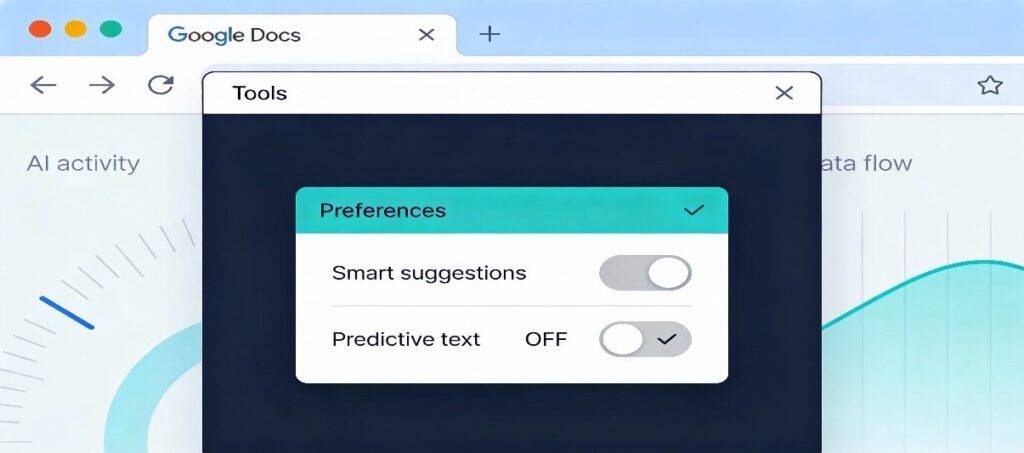
Turn off Docs smart features: In an open document, go to Tools → Preferences and disable smart suggestions such as Smart Compose or similar AI-powered options where available. This limits how much live document content is routed through predictive systems.
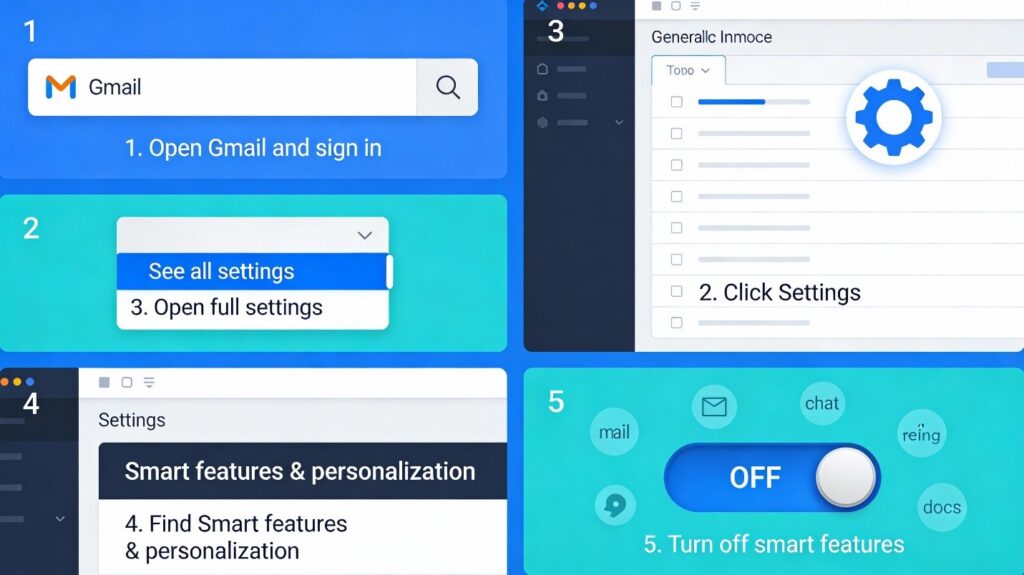
Disable cross-product smart features: Open Gmail on desktop, go to Settings → See all settings, and scroll to the Smart features and personalization section, where you can switch off smart features in Gmail, Chat, Meet, and other Google products. Because Google links these settings across Workspace, turning them off can remove or reduce generative options like “Help me write” in Docs as well.
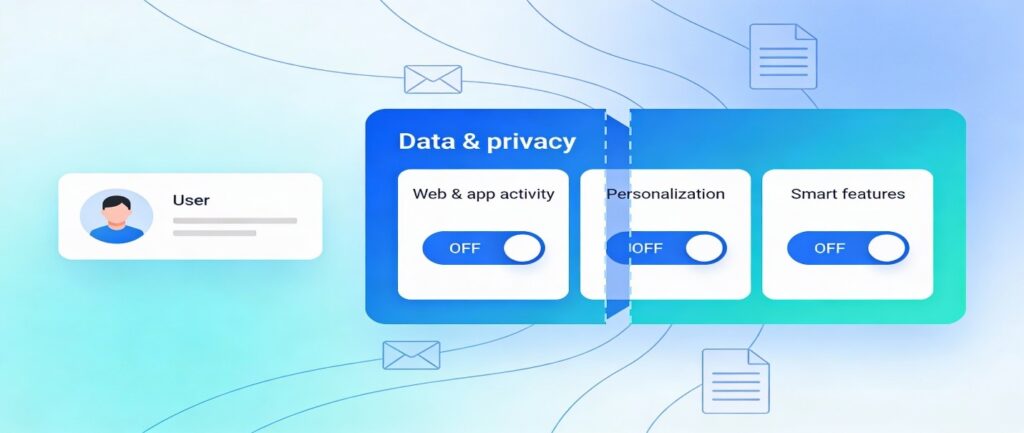
Reduce account-level data use: In your Google Account under Data & privacy, turn off options like Web & App Activity, certain personalization settings, and smart features that allow data from Gmail and Docs to feed personalized AI behavior. These switches do not guarantee that your content never touches machine learning systems, but they do narrow the scope of how it is reused.
From a content strategy perspective, reducing these features is part of a broader AI integration posture. you are choosing when AI helps you write and when privacy takes priority.
Keep Your Docs Out of Public AI Datasets
Even if you tighten in-app settings, your documents can still end up in AI training data if they are effectively public. That risk increases dramatically when teams default to “anyone with the link can view” or accidentally publish Docs on public sites.
The most important habits here are straightforward.
Always check the Share dialog and avoid “Public on the web” or similarly open settings unless you genuinely want a document indexed. When you do embed or link Docs on a website, remember that anything visible to search engines can be swept into future datasets, just as if it were a static HTML page. If you manage a site, you can also use tools like robots.txt and AI-specific crawler blocks (such as mechanisms that control Google-Extended and other AI-training crawlers) to discourage large-scale scraping of content you host.
Many organizations that handle confidential material are now rewriting their sharing policies and training staff to treat Docs links like public URLs, not private attachments. The moment something is posted in a public Slack channel, forum, or blog, it becomes fair game for indexing and downstream AI training flows.
When to Leave Google Docs Entirely
There is an uncomfortable but honest conclusion at the bottom of all of this: if you need hard guarantees that your content will never be used to train AI, the surest answer is to stop using Google services for that content. Marketers, legal teams, and security leads are increasingly moving the most sensitive work into tools that provide end-to-end encryption and explicit contractual limits on how data can be processed.
Alternative document platforms that emphasize privacy give you stronger technical boundaries: content is encrypted before it reaches the server, and providers commit not to use it for model improvement. Some privacy-focused suites pair storage with collaboration and file-sharing that mirror Docs’ convenience without the same exposure to broad AI pipelines. For companies that already run internal AI training or internal-only assistants, this shift also makes it easier to control exactly which datasets are feeding in-house models versus external providers.
For a brand like Mental Forge AI, that distinction matters. Teaching clients how to separate “public web content we expect models to see” from “private corpus we will never let out of our stack” is increasingly part of any serious AI governance conversation.
Building a Sustainable AI Strategy Around Docs
Stopping Google Docs from training AI is not a single toggle. In spite it is a set of ongoing choices about tools, settings, and habits. You dial back smart features, avoid feeding sensitive text into Gemini panels, lock down public sharing, and decide which documents are simply too valuable to entrust to any cloud platform that reserves the right to evolve its models at scale.
When this topic is handled with a bit of care, it stops feeling like a barrier and starts to open doors. Teams that pause to reconsider how they store, share, and create documents usually become more deliberate about AI integration in general, whether they are building internal tools, selling AI-driven products, or hosting AI workshops to help non‑technical colleagues understand what responsible use actually looks like day to day.